Key Takeaways
- An SBOM is a machine-readable inventory of every component in a software artifact, including names, versions, licenses, hashes, and relationships. It provides complete visibility into what is included.
- SBOMs apply across container images, application binaries, OS packages, open source libraries, and AI/ML containers. The standard supports the entire software supply chain, not just a single artifact type.
- Build-time generation is the most reliable approach. Post-deployment scans attempt to reconstruct information afterward and can miss runtime-installed packages, while build-time SBOMs capture the exact assembled state.
- Use SPDX for regulatory submissions and legal compliance reviews. Use CycloneDX for developer tooling and vulnerability management workflows. If both audiences consume the data, generate both formats from a single scan.
- An SBOM identifies what is present, not whether it is exploitable. Every associated CVE may appear as a finding regardless of actual reachability or runtime impact.
- Generating an SBOM is only the starting point. The real security value comes from keeping it accurate, signing it cryptographically, storing it alongside the image digest, and integrating it with security and compliance tooling.
Modern software is assembled from thousands of third-party components, most of which organizations never directly write or review. Container images routinely include operating system packages, language runtimes, transitive dependencies, and inherited base image components that development teams may not even realize are present.
When a major vulnerability like Log4Shell appears, security teams immediately face the same challenge: identify where the affected component exists, determine which workloads are exposed, and assess risk before attackers can exploit it.
Software Bills of Materials (SBOMs) were created to solve the visibility problem at the center of modern software supply chain security.
What Is an SBOM?
A Software Bill of Materials (SBOM) is a machine-readable inventory of every software component in an artifact: an application, a container image, a firmware package, or an operating system.
It is like a nutrition label on packaged food. Before nutrition labels existed, you had no way of knowing what a product actually contained: just a brand name and a general category. An SBOM does for software what that label does for food. It lists the ingredients, their versions, where they came from, and enough metadata for downstream tools to reason about them automatically.
The analogy holds in another useful way too. A nutrition label doesn't tell you whether a meal is healthy for you specifically. That depends on your diet, allergies, and health goals. Similarly, an SBOM doesn’t tell you whether a vulnerability is exploitable in your specific context. It tells you what is there. What you do with that information is a separate question.
SBOM adoption accelerated after Executive Order 14028 in 2021, which pushed federal software procurement toward greater software transparency and supply chain visibility through initiatives led by NIST and related agencies. The EU Cyber Resilience Act followed with similar requirements. Supply chain attacks like Log4Shell (CVE-2021-44228), which propagated through thousands of downstream applications through a single logging library, made the case concrete: organizations couldn't respond to vulnerabilities they couldn't even locate in their own software.
Where Does an SBOM Apply?
What Types of Software Can Have an SBOM?
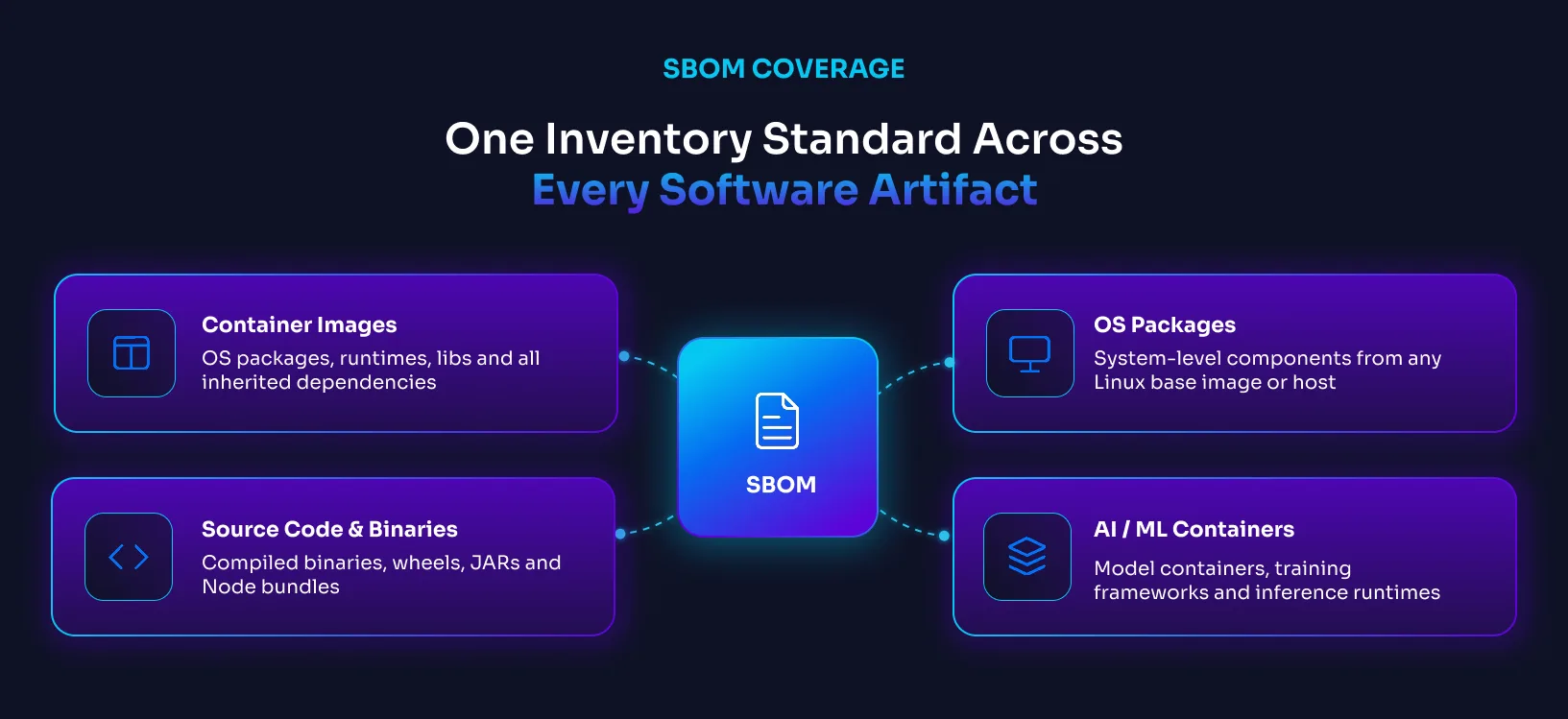
SBOMs can be generated for virtually any software artifact:
Container images are the most common use case today. A typical production container ships with far more than the application itself: OS packages, language runtimes, system libraries, and transitive dependencies inherited from the base image. An SBOM makes all of it visible.
Application source code and binaries: They carry their own dependency trees that an SBOM can document. This includes compiled binaries, JAR files, Python wheels, and Node.js bundles.
Operating system packages: the system-level components that come with any Linux base image or host environment are catalogued in an SBOM alongside application dependencies.
Open source libraries and transitive dependencies: This is where the real complexity lives. Your application declares a set of direct dependencies. Each of those pulls in its own dependencies, and those pull in more. The actual component count in a production artifact is almost always far larger than what any team deliberately chose.
AI and ML containers: They are increasingly common in production environments and carry the same SBOM requirements as any other artifact. Tooling support for cataloguing their specific dependency patterns is still developing.
Where It Fits in Your Workflow
An SBOM is not just a compliance document. It is an active input into several parts of how software is built, shipped, and audited.
CI/CD pipeline gating. Generate an SBOM at build time, scan it against known vulnerabilities, and block the build if anything above your risk threshold appears. This catches problems before they reach staging.
Vulnerability scanner input. Scanning tools can consume an SBOM directly instead of scanning the image from scratch. This is faster and more reproducible: the scanner works from a defined inventory rather than re-discovering components on every run.
Compliance and audit evidence. When an auditor asks "what software is running in production?", an SBOM is the documented, machine-readable answer. EO 14028, PCI-DSS 4.0, FedRAMP, and SOC 2 all have language around software inventory. An SBOM helps satisfy those software inventory and transparency requirements.
Vendor and procurement risk assessment. Before accepting a third-party component or a vendor-supplied container image, you can request their SBOM. If they can't produce one, that's a signal. If they can, you can feed it into your toolchain and understand the risk before it enters your environment.
An SBOM describes what components exist inside an artifact. It does not by itself prove where those components came from or whether the build process was trustworthy. Provenance attestations and signed build metadata address that separate trust problem.
Anatomy of an SBOM: What's Actually Inside
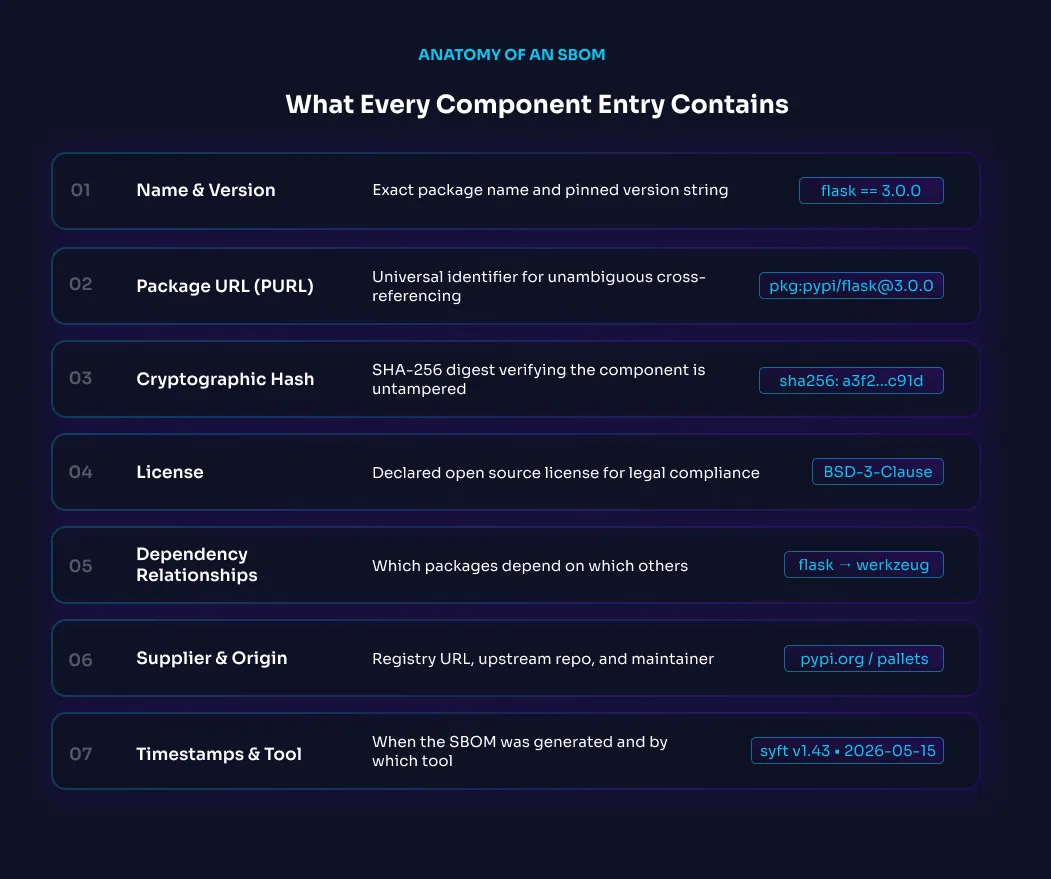
An SBOM is a structured document with multiple data types, all linked together. Understanding what each field actually contains helps you evaluate whether a given SBOM is complete enough to be useful.
Component name and version: It includes the package name and the exact version string. "flask" and "3.0.0" are more useful than "flask" and "latest." Pinned versions are what make SBOMs actionable.
Package URL (PURL): A standardized identifier that encodes the package ecosystem, name, version, and optional namespace. It is what allows SBOM tooling to cross-reference components against vulnerability databases without ambiguity.
Cryptographic hashes (typically SHA-256): Theyare calculated over the package contents. Let you verify that the component you have is exactly what was declared: not a modified version, not a different package with the same name.
License information covers the declared license for each component. This matters for legal compliance and open source obligations. Shipping a GPL-licensed library in a commercial product without disclosure is a legal risk, not just a security one.
Dependency relationships are what separate a useful SBOM from a flat list. A good SBOM documents which packages depend on which others. This relationship graph is what makes it possible to ask "if OpenSSL has a vulnerability, which of my components are affected?" without manually tracing dependency trees.
Supplier and origin metadata record where the component came from: the registry URL, upstream repository, or maintainer. This contributes to software provenance by helping identify the origin of components, even though an SBOM alone does not verify how the artifact was built.
Timestamps and tool metadata record when the SBOM was generated and by which tool. An SBOM without a timestamp is harder to interpret: you don't know if it reflects the current state of the image or something from six months ago.
SBOM Standards: SPDX vs CycloneDX
Two formats dominate the SBOM world. They serve slightly different audiences and purposes, but both are legitimate and widely supported.
SPDX
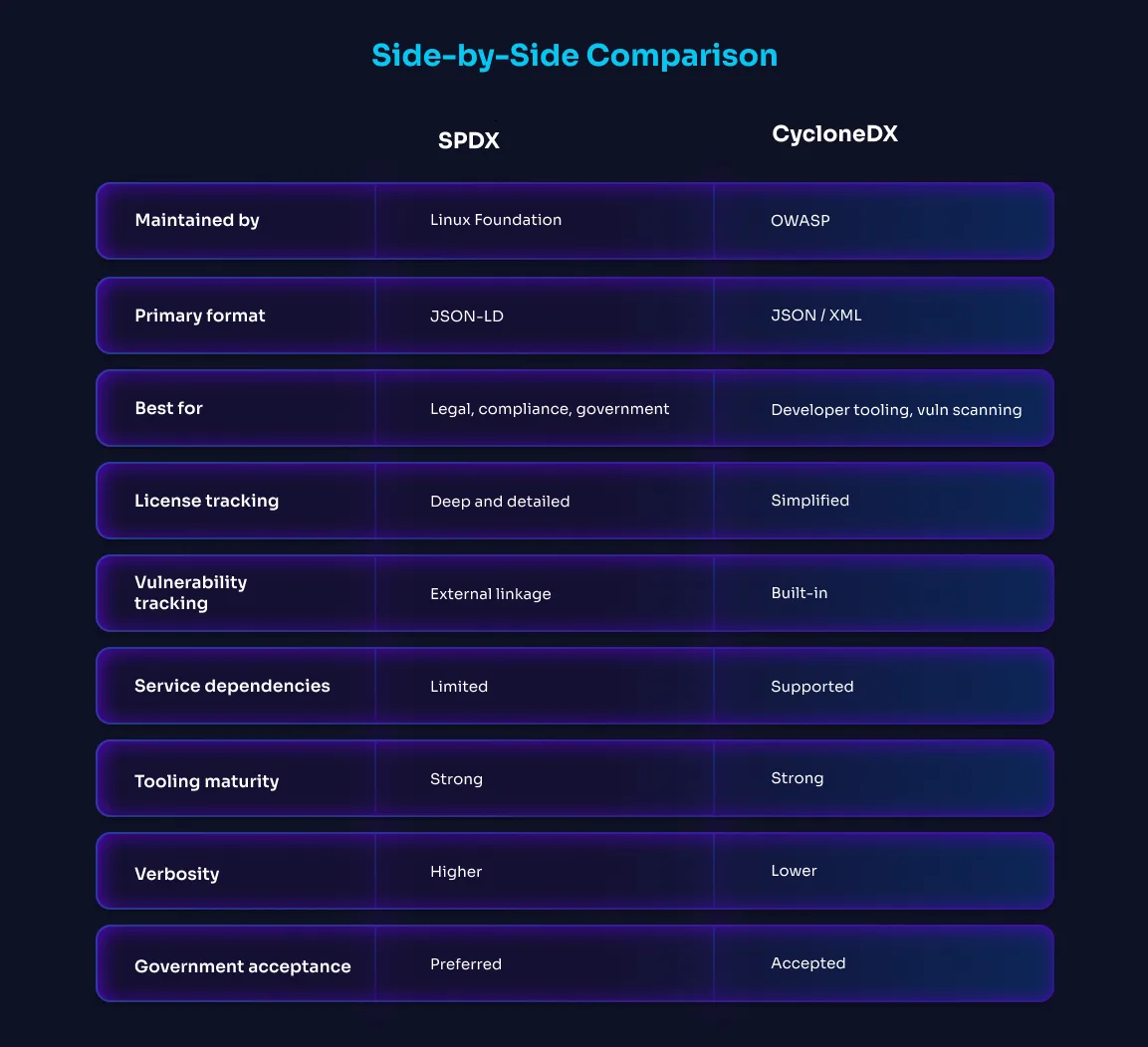
SPDX (Software Package Data Exchange) is maintained by the Linux Foundation and has the longest history among SBOM standards. SPDX supports multiple serialization formats including JSON, tag-value, RDF/XML, and YAML, with strong adoption in compliance and legal review workflows. It is widely used in government and enterprise environments because of its mature support for license compliance alongside security metadata.
SPDX is thorough. It supports rich relationship types, detailed provenance fields, and complex component hierarchies. That thoroughness is also its main criticism; SPDX documents can be verbose, and tooling maturity varies across ecosystems.
Best for: Regulatory submissions, government contracts, legal compliance review, enterprise security governance.
CycloneDX
CycloneDX was created by OWASP with developer tooling as the primary audience. It supports JSON and XML, integrates closely with vulnerability management workflows and vulnerability data formats, and has built-in support for tracking exploitability status alongside component inventory. The format is more compact than SPDX and has strong tooling support across languages and ecosystems.
CycloneDX includes support for describing services, APIs, and operational dependencies in addition to software libraries, making it increasingly useful in modern distributed application environments.
When to Use Which
Use SPDX when you're producing SBOMs for regulatory submission, legal review, or government procurement. Use CycloneDX when you're building developer tooling, CI/CD pipelines, or vulnerability management workflows.
If you're operating in a context where both auditors and developers consume the same SBOM data, generate both. Most serious SBOM tooling supports both formats from a single scan.
How to Create and Manage an SBOM
Generation Approaches
Source-based generation: Analyzes the dependency manifest files in your source code — package.json, requirements.txt, go.sum, pom.xml. This is the most complete method for application dependencies because it reads from the authoritative record of what you intended to include. The limitation is that it only captures what was declared, not what was actually compiled or installed.
Build-time generation: Happens during the CI/CD pipeline, after the image is assembled but before it ships. Different tools scan the filesystem of the built container image and catalog everything present: OS packages, language packages, executables, and their metadata. Build-time generation is generally the most reliable practical approach because it captures the actual contents of the built artifact, including transitive dependencies that never appeared in any manifest file.
Binary analysis: Reverse-engineers components from compiled artifacts. This is useful for third-party images or proprietary software where you don't have access to the source or build pipeline. Accuracy is lower: binary analysis can miss components, misidentify versions, or fail to capture license information.
Where to Store and Distribute SBOMs
An SBOM that lives only on a developer's laptop is not useful for audits, incident response, or CI/CD gating. It needs to travel with the artifact it describes.
OCI registry attachment: The emerging standard for container SBOMs. Modern OCI registries increasingly support storing SBOMs as OCI artifacts associated directly with container image digests. The SBOM is stored in the same registry as the image and linked to the same image digest through OCI referrers. When a team pulls the image, they can pull the SBOM alongside it. This keeps the inventory and the artifact together.
Artifact storage alongside deployments: Archiving the SBOM file alongside the deployment manifest for each production release. When an auditor asks for the software inventory for a deployment from eight months ago, you have the SBOM for exactly that image digest, not a re-scan of the current image.
SBOM archive per deployment record: For each production deployment, store the image digest, the SBOM (both formats if applicable), the provenance attestation, and the Cosign signature together. This creates an immutable record of what was running and when.
Keeping SBOMs Fresh: The Lifecycle Problem
Here's a problem that doesn't get enough attention. An SBOM is a snapshot. It reflects the state of a container at the moment it was built. The moment a new CVE is disclosed against one of its components, the SBOM is technically accurate but operationally stale.
This creates a maintenance question: when should you regenerate?
The answer is: on every image rebuild. If you've bumped a dependency version, added a package, or changed the base image, the SBOM needs to reflect that. Treating SBOM generation as a one-time step rather than part of the build pipeline is where stale inventory creeps in.
Re-generation triggers to automate:
- Any change to a dependency manifest
- A new base image version upstream
- A rebuild triggered by a CVE disclosure and the resulting dependency upgrade.
- Any CI/CD pipeline run that produces a new image digest
SBOM Best Practices
Generate SBOMs at build time, not after the fact: A build time SBOM captures exactly what was assembled, including component versions and dependency sources, from a known and controlled state. Post deployment scans only reconstruct that information and may miss runtime installed packages or other changes introduced outside the original build process.
Include transitive dependencies, not just direct ones: A requirements.txt lists 15 packages but the actual container might ship with 120. Most of those are pulled in automatically as dependencies of dependencies. Log4Shell (CVE-2021-44228) is the clearest example of why this matters: very few teams had directly declared Log4j, but it was embedded inside frameworks and libraries they were using, making the blast radius enormous.
Sign the SBOM with Cosign: Cosign attaches a cryptographic signature to the SBOM, tied to the image digest it describes. Signature mismatch means tampered data.
Store the SBOM alongside the image digest, not separately: An SBOM filed in a different system from the image it describes is an SBOM waiting to get out of sync. Keep them together in the same registry, same deployment record, same audit trail.
Automate re-generation: Manual SBOM maintenance drifts. The SBOM from last quarter's audit doesn't tell you what's running now. Build SBOM generation into the pipeline so it's impossible to ship without one.
Use both SPDX and CycloneDX: Auditors want SPDX. Your security tooling probably wants CycloneDX. Generate both from the same scan to get the complete coverage.
Pair with provenance attestation (SLSA): An SBOM tells you what is in the image. A SLSA provenance record tells you how it was built — which source commit, which build system, which inputs. Together they answer the full question: what is in this image, and can I trust that it was built correctly?
Can an SBOM Be Wrong or Inaccurate?
SBOMs can be inaccurate in ways that are not always obvious. Here are the most common failure modes.
Runtime-installed dependencies are invisible to static SBOM scanners: One of the biggest limitations of SBOM generation is that most tools perform static analysis. They scan the container filesystem at build time by reading package metadata, lock files, and operating system package databases. They do not execute the container or observe what happens when the application starts.
Any dependency installed dynamically after the image is built can therefore be completely invisible to the SBOM. This includes startup scripts that run package installs, plugins downloaded during application initialization, dynamically loaded modules, or containers that execute pip install or npm install at runtime. The SBOM may appear clean even though additional software is being introduced when the workload starts in production.
This creates a visibility gap between what was present in the original image and what is actually running at runtime. A vulnerability scan against the SBOM only reflects the static contents captured during generation, not software introduced later through runtime behavior or configuration changes. Read more about this in our complete test: Why Your SBOM Might Be Lying to You
Incomplete or missing components: Tools can miss components they were never designed to find. Incomplete transitive traversal leaves out second and third-level packages in unusual ecosystems or with vendored dependencies. Vendored or inlined code, where a library's source is copied directly into a repository rather than declared as a dependency, may not be catalogued at all. Inlining a copy of lodash doesn't make lodash's CVEs go away.
SBOM completeness is a spectrum, not a binary: There is no such thing as a perfectly complete SBOM for a complex application. The question is whether it's complete enough for your purposes and whether you know where its gaps are.
Why Two SBOMs for the Same Image Can Look Different
It is common for two SBOM tools scanning the same container image to produce different results. One tool may report more packages, different dependency relationships, or even entirely different vulnerable components than another. This happens because SBOM generation is not a single standardized scanning method. Different tools use different techniques to discover and identify software components.
Some tools analyze dependency manifests such as package.json, requirements.txt, pom.xml, or go.sum. Others inspect the final container filesystem after the image is built. Filesystem analysis typically captures more of what is actually present in the built artifact, including OS packages and transitive dependencies, while manifest-based analysis focuses on what developers explicitly declared. Both approaches have limitations.
Package ecosystems also expose metadata differently. Debian, Alpine, RPM, Python, and Node.js packages all store dependency information in different ways, and some environments preserve far less metadata than others. Minimal and distroless images make detection harder because they intentionally remove package managers and metadata stores.
Binary analysis introduces additional uncertainty. When scanners attempt to identify components from compiled binaries rather than package metadata, version detection becomes less reliable, especially for statically linked or stripped executables. Vendored or inlined dependencies create another blind spot because copied source code may not appear in package management records at all.
This is why SBOM completeness is a spectrum rather than a binary state. An SBOM is only as accurate as the visibility available to the tool that generated it and the metadata available inside the artifact itself. The important question is not whether an SBOM is perfect, but whether it is complete and trustworthy enough for the operational decisions you need to make.
This is why SBOM generation should be treated as an engineering discipline, not a checkbox exercise. The quality and completeness of an SBOM depends heavily on how it was generated, what was scanned, and which assumptions the tooling makes about the software environment.
Shortcomings and Limitations of SBOM
Understanding what an SBOM doesn't do is as important as understanding what it does.
An SBOM tells you what, not whether it's exploitable. You might have a component with a known CVE. The SBOM will tell you it's there. It won't tell you whether the vulnerable function is actually called in your application, whether the execution path that triggers the vulnerability is reachable, or whether your runtime environment mitigates it. That's a separate analysis — one that VEX (Vulnerability Exploitability Exchange) documents are designed to address (more on that in a future article in this series).
It doesn't capture runtime behavior, configuration drift, or function-level reachability. An SBOM reflects a container image at a point in time. It says nothing about how the container is configured when deployed, and it can't tell you whether a vulnerable function is actually called in your application. Static composition analysis and dynamic reachability analysis are different things.
SBOM is evidence, not remediation: Having an SBOM doesn't fix vulnerabilities. It doesn't reduce your attack surface. It doesn't prevent supply chain attacks. What it does is give you the inventory required to do those things systematically, to know which images are affected when a new CVE drops, to demonstrate to auditors that you know what you're running, to make better decisions about patching priority.
Conclusion
SBOMs have become a foundational part of how the industry is responding to software supply chain risk. Generating one is the starting point. The real value comes from keeping it accurate, connecting it to the tools that act on it, and treating it as a living part of your security practice rather than a document you produce once for an audit.
Three things to do after reading this:
- Audit one production image, generate an SBOM and check whether it's signed, whether it includes transitive dependencies, and how old it is.
- Check whether your SBOMs are stored alongside image digests in your deployment records, or filed separately where they can drift.
- Verify that your SBOM generation happens at build time, not as a manual post-hoc step.
Generate a signed SBOM for one of your production images and examine what it actually contains, how complete the inventory is, and whether the SBOM is tied cryptographically to the image digest it describes.