Vulnerability scanning finds security weaknesses across systems, networks, cloud workloads, and applications before attackers exploit them. This article covers what it is, how scanners work using sources like NVD and CVSS, key scan types, tools, cloud and CI/CD use, best practices, common challenges, and FAQs.
What is Vulnerability Scanning?
Vulnerability scanning is the systematic process of automatically identifying security weaknesses, misconfigurations, and known vulnerabilities in systems, networks, applications, and devices. It uses specialized tools to scan assets against databases of known flaws (such as outdated software, missing patches, weak settings, or exposed services) and reports potential risks before attackers can exploit them.
In practice, vulnerability scanning helps organizations understand their security posture, prioritize remediation based on risk severity, and maintain compliance by continuously detecting and reducing exploitable security gaps.
Find and fix critical vulnerabilities faster
Book a demoHow vulnerability scanner works?
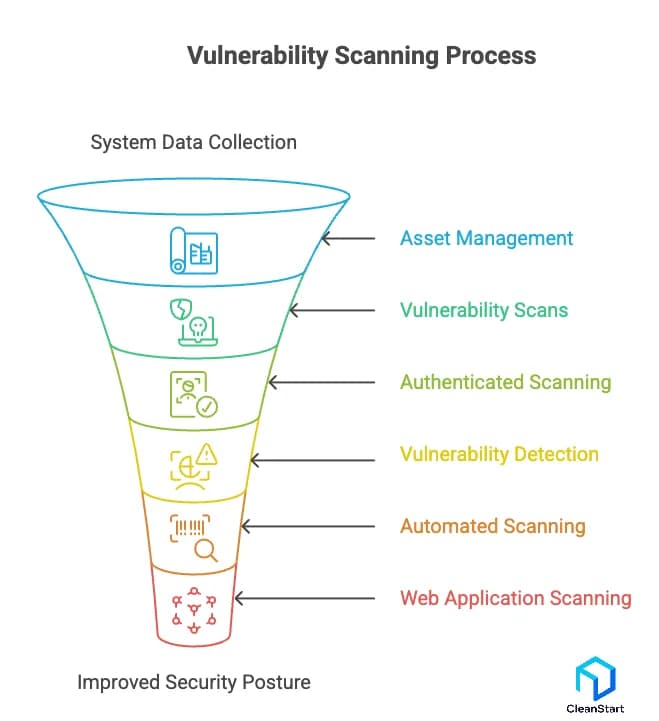
A vulnerability scanner works by collecting system data, comparing it against an up-to-date vulnerability database, and performing targeted checks to identify weak points across hosts, networks, and web application vulnerability surfaces. It uses both active scanning and passive scanning techniques to uncover misconfigurations, outdated components, and exposures that create security risks.
Here are the core steps in how the scanning process works:
- Performs asset management to map systems before choosing the type of scan
- Runs external vulnerability scans and internal vulnerability scans to detect weaknesses across environments
- Uses authenticated scanning for deeper checks on configuration errors and unpatched components
- Conducts vulnerability detection through signatures, behavior-based rules, and correlation with the National Vulnerability Database
- Applies automated scanning or continuous scanning to maintain ongoing visibility
- Executes web application vulnerability scanning and DAST tools checks aligned with the OWASP Top 10
- Supports database vulnerability scanning, host vulnerability scanning, and network vulnerability scanning depending on scope
- Integrates results into the vulnerability management lifecycle for prioritization as a key step in the vulnerability management process
- Feeds findings to security information and event management systems for correlation
- Helps improve overall security posture through regular scanning, best practices, and timely patch management
What are the types of vulnerability scanning?
The main types of vulnerability scanning reflect how scanning works across different layers of an environment and what each method is designed to uncover. These types of vulnerability scanning support comprehensive vulnerability management, strengthen visibility, and help organizations improve their security posture by detecting weaknesses before vulnerability exploitation occurs.
Here are the different types of vulnerability scans:
- External scanning - which evaluates internet-facing assets to understand the impact of a vulnerability an attacker could reach first.
- Internal scanning - which identifies misconfigurations, lateral-movement paths, and exposures that exist inside the network.
- Authenticated scanning - which allows deeper checks using credentials, enabling detection of issues that security tools cannot see from the outside.
- Unauthenticated scanning - which mimics an outsider’s perspective and highlights externally visible weaknesses.
- Web application scanning - which uses a web vulnerability scanner or web application security scanner to detect injection flaws, access control issues, and open source vulnerability risks.
- Host-based scanning - which checks OS configurations, permissions, and patch gaps as part of a structured vulnerability assessment.
- Network scanning - which examines services, protocols, and exposure points that influence the impact of a vulnerability across connected systems.
- Database scanning - which identifies insecure configurations, weak permissions, and unprotected data paths.
- SAST tools and static application security testing - which analyze source code early in development.
- DAST tools and dynamic application security testing - which test running applications for real-world behavior-based issues.
- Automated vulnerability scanning - which uses automated tools and continuous vulnerability management workflows to catch issues at scale.
Why is vulnerability scanning important for reducing measurable cyber risk?
Vulnerability scanning reduces measurable cyber risk by giving security teams clear visibility into existing security vulnerabilities and security flaws across systems. It identifies different types of vulnerability early, allowing organizations to respond before threats escalate.
Here are the key reasons it reduces cyber risk:
- Detects vulnerabilities before attackers can exploit them
- Highlights misconfigurations and security flaws that increase exposure
- Prioritizes issues based on severity for faster remediation
- Provides measurable data to track risk reduction over time
- Strengthens overall security posture through continuous assessment
How do vulnerability databases like NVD and CVSS scoring support effective vulnerability scanning?
Vulnerability databases such as the National Vulnerability Database (NVD) and the Common Vulnerability Scoring System (CVSS) play a critical role in how scanners identify, classify, and prioritize security weaknesses. They provide standardized information that helps security teams understand the severity and potential impact of each vulnerability.
Here’s how they support vulnerability scanning:
- NVD supplies authoritative vulnerability data, including CVE identifiers, descriptions, affected software versions, and references.
- CVSS scoring assigns a numerical severity rating, helping teams quickly judge the urgency of each finding.
- Scanners map detected issues to NVD entries to confirm accuracy and gather detailed context.
- CVSS base, temporal, and environmental scores guide prioritization by reflecting exploitability and real-world impact.
- These systems ensure consistent, comparable risk evaluation across tools and environments.
What are vulnerability scanning tools?
Vulnerability scanning tools are automated security solutions that detect weaknesses, misconfigurations, and exposure points across systems, networks, and applications. They work by using vulnerability signatures, configuration checks, and behavioral analysis to highlight issues that threaten an organization’s security posture. These tools are essential because vulnerability scanning matters for early detection and continuous risk reduction.
Here are the key functions of vulnerability scanning tools:
1. Automated Detection of System Weaknesses
They scan for outdated components, insecure configurations, and exploitable conditions, helping teams act before attackers do.
2. Continuous Visibility Across Environments
They support vulnerability scanning across servers, networks, cloud resources, and applications, giving a unified view of exposure.
3. Integration with Security Solutions
These tools complement firewalls, monitoring tools, and other security solutions, forming a critical part of a layered defense strategy.
4. Support from Vendors and Open-Source Tools
They are available through vendors or scanning tools and tools like commercial suites or open-source options, each offering different depth and automation levels.
5. Identification of Scanning Challenges
They help uncover vulnerability scanning challenges, including misconfigurations, authentication gaps, or legacy system issues that require remediation.
Internal vs External Vulnerability Scanning: What’s the Difference?
Internal and external vulnerability scanning assess different parts of the attack surface. Internal scanning finds weaknesses inside the network, while external scanning identifies exposures visible to outside attackers. Together, they provide a complete view of organizational risk.
Aspect | Internal Vulnerability Scanning | External Vulnerability Scanning |
Purpose | Finds weaknesses inside the network | Finds vulnerabilities exposed to the internet |
Perspective | Insider or attacker with internal access | Unauthenticated external attacker |
Scan Depth | Deeper, often authenticated | Surface-level, perimeter-focused |
What It Detects | Misconfigurations, unpatched systems, internal exposure paths | Open ports, outdated public services, perimeter misconfigurations |
When It’s Required | After system changes, compliance checks, or internal incidents | Regular perimeter assessments and compliance audits |
Security Value | Reduces lateral movement and internal risk | Reduces initial attack surface and external entry points |
Which scanners support cloud, container, and CI/CD workloads?
Scanners that support cloud, container, and CI/CD workloads are designed to detect vulnerabilities across dynamic, fast-changing environments where traditional tools fall short. In container environments, they scan container images, configurations, and dependencies to uncover vulnerabilities across build and runtime stages. These platforms integrate directly into cloud services, image registries, and pipelines to provide continuous inspection throughout the build and deploy lifecycle.
Here are the scanners that typically support these workloads:
1. Cloud-Native Vulnerability Scanners
These tools scan cloud instances, configurations, and managed services, offering real-time visibility into misconfigurations and exposed resources often highlighted in scanning tools by listing directories.
2. Container Image Scanners
They scan container images locally or in registries, identifying outdated packages, misconfigurations, and base-image risks before deployment.
3. CI/CD Pipeline Scanners
These scanners integrate into build stages to flag vulnerabilities early and prevent insecure code from reaching production.
4. Unified Cloud and DevSecOps Platforms
Some vendors provide combined tools that secure cloud, container, and CI/CD workflows within a single platform for end-to-end coverage.
Detect CVEs and misconfigurations early when you
pull container imagesVulnerability scanning VS Penetration testing: What’s the difference?
Vulnerability scanning and penetration testing serve different roles in security. Scanning automates the discovery of weaknesses, while penetration testing manually exploits them to reveal real-world impact.
Aspect | Vulnerability Scanning | Penetration Testing |
Purpose | Finds vulnerabilities and misconfigurations | Exploits vulnerabilities to assess actual risk |
Method | Automated tools | Manual attacker-style techniques |
Dept | Broad visibility | Deep, targeted analysis |
Output | List of issues to fix | Proof of exploit and attack path insights |
Frequency | Continuous or scheduled | Periodic or compliance-driven |
Skill requirement | Minimal, tool-based | High, expert-driven |
Goal | Improve overall security hygiene | Understand real impact of weaknesses |
How does network vulnerability scanning work?
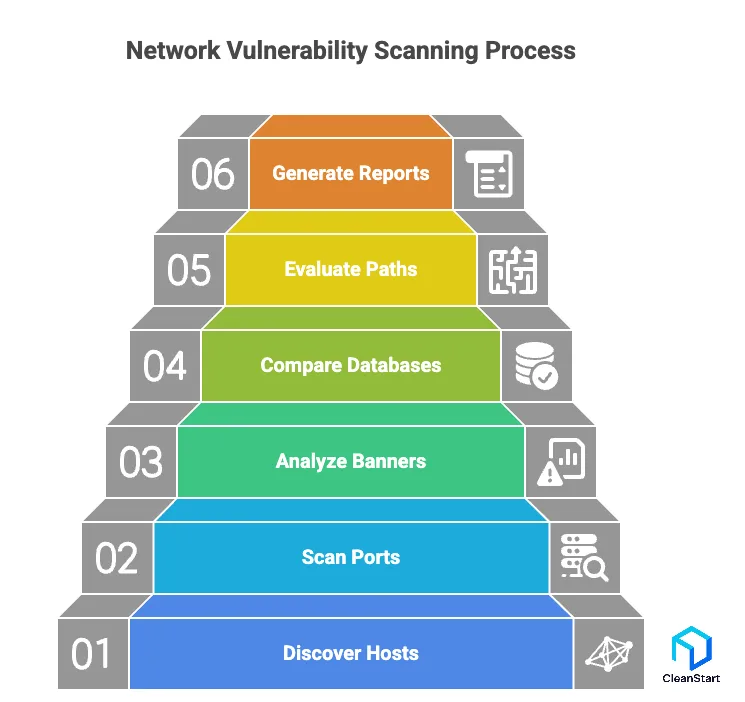
Network vulnerability scanning works by examining network-connected assets to identify exposed services, misconfigurations, outdated components, and weaknesses that attackers could exploit. The scanner maps the network, probes reachable systems, and compares findings against known vulnerability signatures and configuration baselines to reveal security gaps.
Here is how it works:
- Discovers active hosts, IP addresses, and reachable services across the network
- Scans open ports and protocols to identify what is exposed externally or internally
- Analyzes banner information to detect outdated software or insecure configurations
- Compares system data against vulnerability databases to flag known risks
- Evaluates network paths, access controls, and misconfigurations that increase exposure
- Generates reports prioritizing vulnerabilities based on severity and exploitability
This process provides clear visibility into network-level weaknesses, helping security teams remediate issues before they become exploitable attack vectors.
How does cloud vulnerability scanning work?
Cloud vulnerability scanning works by inspecting cloud resources, configurations, workloads, and services to identify weaknesses that arise from misconfigurations, insecure deployments, outdated components, and exposed interfaces. The scanner integrates with cloud provider APIs and analyzes assets continuously as they scale and change.
Here is how it works:
- Connects to cloud accounts through API permissions to inventory virtual machines, storage, networks, and managed services
- Evaluates configurations against security best practices and cloud-native baselines
- Scans workloads for outdated software, missing patches, and vulnerable components
- Detects exposed interfaces, misconfigured security groups, and risky IAM permissions
- Analyzes container images, serverless functions, and CI/CD artifacts for vulnerabilities
- Correlates findings with real-time cloud activity to highlight high-risk exposures
- Generates prioritized remediation guidance based on severity and blast radius
This process ensures cloud environments remain secure despite constant scaling, dynamic workloads, and rapid deployment cycles.
What are best practices for vulnerability scanning?
Best practices for vulnerability scanning focus on ensuring accurate detection, consistent visibility, and timely remediation across all systems and applications. Effective scanning strengthens overall security posture by reducing blind spots and preventing exploitable gaps.
Here are the key best practices:
1. Scan Regularly and After Major Changes
Run scheduled scans and trigger additional scans whenever infrastructure or applications are updated.
2. Use Both Internal and External Scanning
Cover exposure from inside the network and from the public-facing perimeter.
3. Enable Authenticated Scanning
Use credentials to detect deeper misconfigurations and missing patches that unauthenticated scans cannot see.
4. Integrate Scanning Into CI/CD Pipelines
Identify vulnerabilities early in development to prevent insecure code from reaching production.
5. Prioritize Findings Based on Risk
Rank vulnerabilities by severity, exploitability, and impact to focus remediation efforts.
6. Maintain a Complete Asset Inventory
Ensure all systems, applications, and cloud resources are included in the scanning scope.
7. Validate and Verify Results
Review findings to reduce false positives and ensure accuracy before remediation.
8. Align Remediation With Business Requirements
Fix issues according to compliance needs and operational risk.
9. Update Scanning Configurations Frequently
Refine scanner settings and policies as infrastructure, dependencies, and threats evolve.
Explore end-to-end vulnerability scanning
Book a demoWhat challenges occur during vulnerability scanning?
Challenges during vulnerability scanning arise from technical limitations, environmental complexities, and the dynamic nature of modern systems. These issues can affect accuracy, coverage, and the ability to act on findings efficiently.
Here are the common challenges:
- False positives and false negatives, which lead to wasted effort or missed vulnerabilities
- Incomplete asset coverage when systems are not properly inventoried or frequently change
- Authentication failures that prevent deep scanning of critical configurations
- Performance impact on systems if scans are run during peak operational hours
- Outdated or noisy vulnerability data that makes prioritization difficult
- Complex cloud and container environments where assets are short-lived and rapidly changing
- Limited context for risk scoring, making it harder to assess true impact
- Integration gaps with ticketing, monitoring, or remediation tools
- Misconfigured scanners, which can reduce accuracy or skip important checks