Container networking is the “traffic system” that lets containers and microservices communicate quickly and reliably. This article covers how it works under the hood, what problems it solves, the main networking models, and interoperability standards like CNI. It also covers how Docker and Kubernetes handle container networking and how it differs from traditional networking.
What is container networking?
Container networking is the way a container connects to other containers, services, and external systems through a logically isolated but configurable container network built on top of the host’s Linux network stack. A container is a lightweight, portable runtime environment that packages an application and its dependencies so it can run consistently across different systems. In practice, each container is given its own network namespace, which includes a dedicated network interface, its own IP address, and separate routing and firewall rules, so that multiple applications can share one host without interfering with each other’s traffic.
What are the key components of a container network?
The key components of a container network are the building blocks that let containers created from a container image communicate reliably inside a virtual network and with the outside world.Here are the key components that make up a container network:
- Container network interfaces
Virtual NICs (for example, eth0 in a Docker container) connect each container to the container network. - Virtual networks (bridge and overlay)
The runtime (such as Docker) creates a virtual network (bridge on one host, overlay across hosts) where containers exchange traffic. - IP addressing and subnets
Each container gets an IP from an internal subnet so services can reach each other predictably. - Routing and gateways
Routing tables and gateways move traffic between subnets and out to external networks in multi-host setups. - Port mappings and service exposure
Host–to–container port mappings expose selected services while keeping non-mapped ports private. - Service discovery and DNS
DNS-based discovery lets containers call each other by name instead of hard-coded IP addresses. - Network policies and firewall rules
Network policies and firewall rules restrict which containers and clients can communicate. - Runtime configuration and automation
Orchestrators and CLIs configure all these pieces declaratively, scaling networking more efficiently than per–virtual machine setups.
Secure your stack from day one, Pull Trusted
Cleanstart container imagesHow does container networking work?
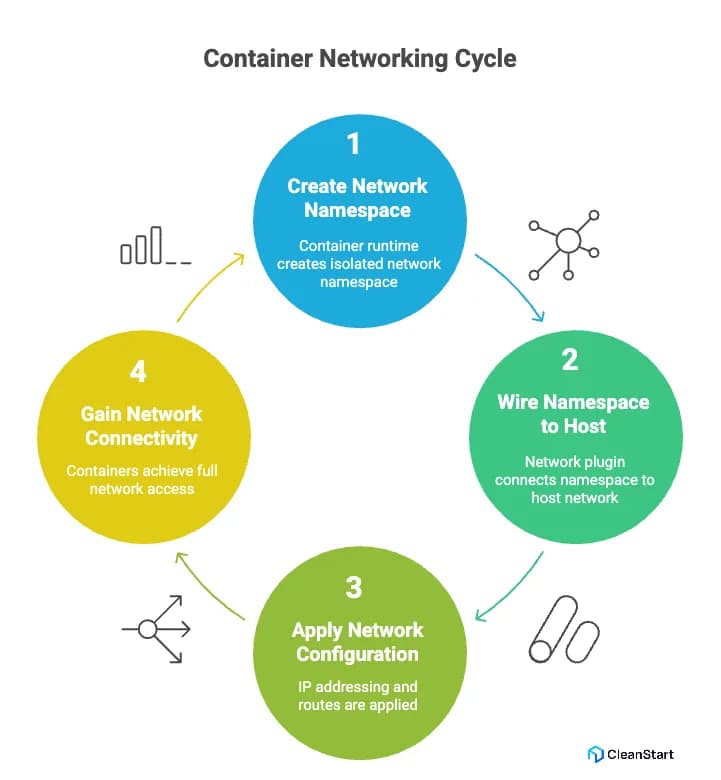
Container networking works by giving each container a logically separate view of the network while still sharing the host’s network stack in a standard Linux kernel, which is a core principle of modern containerization, the technology that packages applications and their dependencies into isolated, lightweight environments that run consistently across systems.
At a low level, a container runtime (for example, Docker or containerd) creates a network namespace’s for each single container or pod. That namespace gets its own loopback device and virtual network devices, so the container’s processes see an isolated containers’ network.
Next, the runtime or a network plugin (often following the CNI specification from the open container initiative) wires that namespace into the main network:
- A virtual Ethernet pair connects the namespace to a network driver on the host, usually a linux bridge, open virtual networking, or another L3 network implementation.
- That driver belongs to a defined network mode (for example, bridge or host) and a specific new network the container using it will join.
- IP addressing, routes, and DNS are applied as part of network configuration, so containers running on the host gain full network connectivity as first-class nodes.
What problems does container networking solve?
Container networking solves a set of practical problems that appear as soon as you start running many Linux containers across hosts and environments, especially when you need to maintain consistent container security, which is the practice of protecting containers, their images, and their runtime environment from vulnerabilities, misconfigurations, and unauthorized access, alongside connectivity. Key problems container networking solves:
- Dynamic connectivity for ephemeral containers
Container networking lets every new container receive a unique IP address and automatic network access, so you don’t manually configure network interfaces or routes on each container host. - Reliable communication across hosts and clouds
Overlay networks running on top of the underlay network allow containers on different nodes or Kubernetes clusters (for example on Azure) to communicate as if on one logical network. - Strong isolation on shared Linux hosts
Network namespaces, iptables, and network policy enforcement isolate each container’s network, limiting unauthorized network connections while still allowing required traffic inside and outside the host. - Consistent, programmable networking across runtimes
CNI-based network plugins and drivers (bridge network, host network, OVN) standardize how networking works in Docker networks and Kubernetes networking, simplifying scalable container management and deployment.
What are the types of container networking?
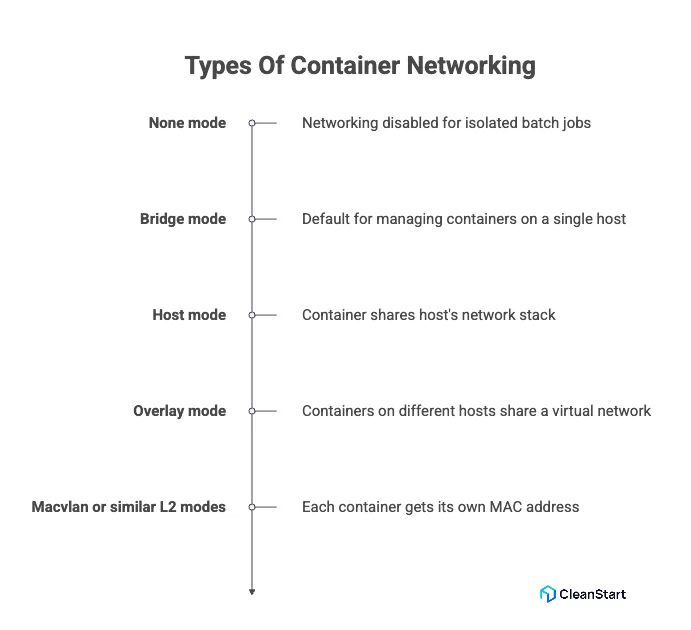
The main types of container networking are modes that define how a container connects to other workloads and external systems, regardless of the container entrypoint, which is the initial command that runs when a container starts, or the application code. Here are the main types of container networking:
- None mode: Networking is disabled; the container has no external interface. Useful for tightly controlled batch jobs where you do not want networking enabled at all.
- Bridge mode: The runtime connects containers to a virtual bridge on the host. This is the default for many setups and is ideal for managing containers that must talk to each other on one host while exposing only selected ports externally.
- Host mode: The container shares the host’s network stack, using the same interfaces and ports as the host. This reduces abstraction but removes isolation at the network layer.
- Overlay mode: Containers on different hosts share a virtual network over the underlying infrastructure, which is critical when scaling services pulled from a central image repository across a cluster.
- Macvlan or similar L2 modes
Each existing container gets its own MAC and appears as a separate device on the physical network, giving fine-grained control when strict IP allocation and low-level networking details matter (for example, legacy appliances or network policies that treat containers as full hosts).
What are container networking standards and CNI?
The Container Network Interface (CNI) is a standard that defines how container runtimes configure networking consistently across platforms. The runtime passes a JSON configuration to a plugin, which sets up the container’s network, assigning IPs, routes, and DNS, and returns a result to the runtime. CNI is essential in container orchestration, the automated deployment, management, and scaling of containers across multiple hosts, ensuring seamless network connectivity as containers are created or moved.
What are the benefits and use cases of container networking?
Container networking lets you run many independent services on shared infrastructure while keeping connectivity predictable, secure, and easy to automate, from pulling Docker images or container images, which are portable snapshots of an application and its dependencies, from a container registry, a repository that stores and distributes these images along with their SBOM (Software Bill of Materials) for transparency and security, to serving live traffic in production.
Key benefits include:
- Higher density on the same hardware: Because containers share the host operating system kernel, more containers can run on the same node while still getting their own IPs, routes, and network resources. This makes container networking more resource-efficient compared to virtual machines, which each need a full OS stack.
- Strong network isolation on shared hosts: Namespaces and policies provide network isolation, so a compromised service cannot freely scan or attack every other workload on the host. You can tightly control which containers can communicate with each other and which external endpoints they may reach.
- Reliable communication for microservices: Service discovery and stable addressing make it easy for containers to communicate across tiers (web, API, database, background jobs), which is essential for microservices, event-driven systems, and API gateways.
- Consistent behavior across environments: The same networking model can be applied on a developer laptop, in a test cluster, and in production, reducing “it works on my machine” issues and simplifying rollouts and rollbacks.
Secure your software supply chain. Book a
CleanStart Demo Today!How is container networking different from traditional networking?
Aspect | Traditional networking | Container networking |
Endpoint identity | Long-lived servers / VMs with stable IPs | Short-lived containers / pods with dynamic IPs |
Isolation | VLANs, subnets, physical/virtual firewalls between hosts | Per-container isolation via namespaces and virtual interfaces on one host |
Configuration | Manually configured, slower topology changes | Declarative configs; topology updates automatically with container changes |
Scale and churn | Designed for relatively static workloads | Designed for high churn and rapid scaling of many containers |
Platform integration | Managed separately from compute and applications | Integrated with orchestrators (e.g., Kubernetes) for SD, LB, network policy |
How is container networking used in Docker and Kubernetes?
In Docker and Kubernetes, container networking is used to give each workload reliable connectivity while hiding most low-level details from developers and operators.
In Docker
- Docker creates a default bridge network on each host and attaches containers to it so they can talk to each other using private IP addresses.
- In Docker Compose, a default network is automatically created for each Compose project, allowing all services defined in the docker-compose.yml file to communicate over a shared network using service names as hostnames. This simplifies multi-container application deployment and ensures consistent connectivity without manual network configuration.
- Host ports are mapped to container ports, which is how Docker exposes HTTP, databases, or APIs to external clients while keeping the rest of the container’s ports private.
- Labels and network aliases let you reference containers by name instead of by IP, simplifying configuration in Docker Compose and similar tools.
In Kubernetes
- Every pod gets its own IP address and participates in a flat cluster network where any pod can reach any other pod directly, regardless of node.
- A CNI plugin (such as Calico, Cilium, or Flannel) implements the pod network, handles IP allocation, and programs routes so workloads can move between nodes without changing how applications connect.
- Services provide a stable virtual IP and DNS name for pods, so applications connect to service-name instead of tracking individual pod IPs.
- Network policies control which pods are allowed to talk to which other pods or external destinations, enabling fine-grained, namespace-scoped network isolation in multi-tenant or security-sensitive clusters.