LXC, also called Linux Containers, provides lightweight isolation for running software on Linux. This guide covers what containers are, how LXC, LXD, and Docker differ, the core mechanisms behind isolation, key LXC vs Docker use cases, and practical container security and hardening steps.
What is a Linux container?
LXC stands for Linux Containers. A Linux container is a lightweight, isolated user-space environment that runs directly on the Linux kernel, using namespaces for isolation and cgroups for resource limits so multiple containers share the same operating system instead of each needing a full virtual machine. It bundles an application with its dependencies and a minimal filesystem pulled from an image repository, which stores and distributes container images in a central, versioned location for easy reuse. This portable unit is managed by a container daemon such as Docker or system tools like LXC, making it fast to start, efficient on Linux systems, and easy to deploy at scale with Kubernetes and other container technologies.
Key points about Linux containers:
- Isolation mechanism: Use namespaces and cgroups instead of hardware-level virtualization.
- Shared kernel: All containers on a host share one linux kernel, reducing overhead.
- Packaged unit: Combine app, dependencies, and filesystem into a repeatable runtime image.
- Runtime tools: Managed by Docker, LXC, and similar container daemon processes.
- Cloud-native fit: Designed for rapid deploy and scaling in Kubernetes and modern platforms.
Try using Cleanstart Containers
What are the benefits of Linux containers for application deployment?
Linux containers improve application deployment by providing a consistent, isolated environment that eliminates differences across systems and keeps the runtime behavior predictable. They package the application with its files in a self-contained unit that runs on the host’s kernel, reducing overhead and enabling a leaner architecture. Containers start quickly, scale efficiently, and update cleanly without affecting the rest of the system. This makes deployment faster, more reliable, and more portable across development, testing, and production environments.
Key benefits for application deployment:
- Consistency: Identical environment across every machine prevents configuration drift.
- Lightweight architecture: Shared kernel reduces resource use and speeds up startup times.
- Faster releases: Rapid build and deploy cycles improve iteration speed.
- Scalability: Easy to replicate and scale horizontally with minimal overhead.
- Isolation: Application-level separation reduces conflicts and simplifies maintenance.
How Linux Container work?
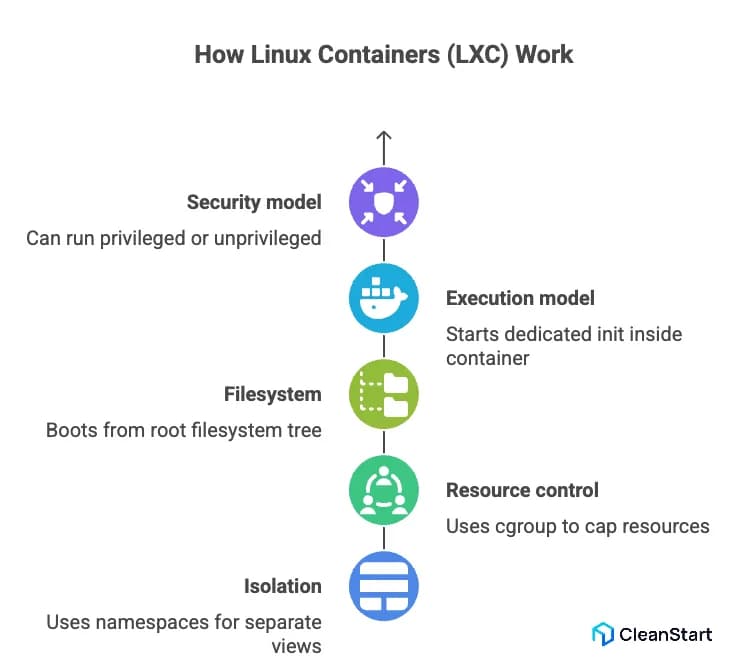
Linux Containers (LXC) is an open source project that implements OS-level containers on Linux by using kernel namespaces and cgroup to isolate processes, networks, and filesystems, so each container behaves like a lightweight Linux system that shares the host kernel instead of running a full VM, while mounting its own root filesystem with everything necessary to run the target workload.
How LXC works in practice:
- Isolation – Uses namespaces to give each container its own view of processes, networking, and mounts.
- Resource control – Uses cgroup to cap CPU, memory, and I/O per container.
- Filesystem – Boots a container from a root filesystem tree instead of pre-built Docker images, typically managed on the host.
- Execution model – Starts a dedicated init inside the container, which then launches services in the correct order to run.
- Security model – Can run as privileged or unprivileged, so running as root inside the container can be mapped to an unprivileged user on the host for safer defaults and better user experience in multi-tenant setups.
How do LXC containers work with namespaces, cgroups, and chroots?
LXC containers work by combining namespaces, cgroups, and chroots so each container gets its own isolated processes, network, and filesystem while still sharing the host kernel; this creates lightweight isolation similar to FreeBSD jails and forms the low-level model that platforms like Kubernetes is an open source orchestrator and OpenShift build on to orchestrate containers.
How namespaces work in LXC
- PID namespaces – Give each container its own process tree with an independent PID 1.
- Network namespaces – Provide separate network stacks (interfaces, routes, firewall rules) per container.
- Mount namespaces – Allow each container to have its own mount table and filesystem view.
- User namespaces – Map container users (including root) to different IDs on the host for safer isolation.
How cgroups work in LXC
- CPU control – Limit how much CPU time each container can consume.
- Memory control – Cap memory usage so one container cannot exhaust host RAM.
- I/O control – Throttle disk I/O to prevent a single container from dominating storage.
How chroots and filesystem isolation work in LXC
- Rootfs confinement – Chroot restricts processes to a container root filesystem tree.
- Minimal userspace – Only files and binaries need to run the services are included, reducing attack surface.
- Controlled sharing – Specific host directories can be bind-mounted into the container without exposing the full host.
Privileged vs. Unprivileged LXC Containers: What is the difference?
Privileged LXC containers map the container’s root user directly to root on the host, while unprivileged LXC containers remap root to a non-privileged UID on the host, so privileged containers are easier to set up but far riskier in case of a breakout, whereas unprivileged containers provide stronger isolation and are better suited for shared and production workloads.
Aspect | Privileged LXC container | Unprivileged LXC container |
Root mapping | Root inside = root on host at the operating system level. | Root inside = unprivileged user on host via UID/GID remapping. |
Security impact | Breakout can give full host control, affecting all workloads and other applications into containers. | Breakout is constrained to a non-root host user, limiting blast radius. |
Isolation strength | Weaker isolation; closer to bare-metal access. | Stronger isolation; better separation in containers and VMs setups. |
Typical use cases | Labs, quick tests, low-risk internal software development. | Multi-tenant hosting, microservice platforms, production systems. |
Configuration effort | Simpler to set up; fewer mappings to manage. | More setup (UID/GID ranges) but safer defaults once configured. |
Production suitability | Generally not recommended for untrusted or internet-facing containers. | Recommended default for most production and shared-host scenarios. |
What is Docker in Linux?
Docker in Linux is a container runtime and a set of tools that use OS-level virtualization and kernel control groups (cgroups) to run containers as isolated processes on a single host. This allows teams to package application code and all required dependencies into lightweight container images, which act as portable, reproducible blueprints for running containerized applications and microservices across any compatible Linux distribution. The result is a fast, efficient alternative to full virtual machines, making Docker a foundational part of modern DevOps workflows for building and deploying software.
Key points about Docker in Linux:
- Packaging model – Uses reproducible container images to bundle everything needed to run applications.
- Runtime model – Runs containers as host processes via cgroups and namespaces instead of traditional containers and virtual machines.
- Platform fit – A common use case is building and operating containerized microservices across environments.
- Operations – Supports managing containers and broader container management with CLI and API tools and services.
- Developer UX – Docker Desktop streamlines local builds and tests so teams can align dev and production behavior.
Why is Docker used for standardizing application packaging?
Docker is used for standardizing application packaging because it bundles code, libraries, and configuration into a single, portable unit that behaves the same across every environment. By turning software into consistent container-based artifacts, Docker removes host-level differences and ensures that applications built on one machine run identically in testing and production. This model works across Linux and Windows containers, allowing teams to deploy and manage workloads with predictable behavior regardless of the underlying infrastructure.
Why Docker standardizes application packaging:
- Uniform runtime – Docker packages all dependencies, so the application no longer relies on host-specific setups or differing underlying technology.
- Environment consistency – The same image moves through every stage of the CI/CD pipeline, eliminating “works on my machine” issues.
- Portable artifacts – Docker images provide a single format that runs on Linux or windows containers using the same workflow.
- Predictable operations – Containers start, stop, and scale dynamically in a controlled way of handling application releases.
- Enhanced security – Isolated packaging keeps containers secure, reducing exposure if an attacker manages to escape the container.
- Cross-platform integration – Teams can make sure Docker integrates cleanly with external tools, APIs, language bindings, or dbus services.
What is the difference between LXC and Docker?
LXC and Docker both use Linux container technologies, but they target different layers. LXC provides system-style containers that behave like lightweight Linux VMs, while Docker focuses on packaging and running application-level containers from images.
Aspect | LXC | Docker |
Level in stack | Low-level Linux container technology for system containers. | Higher-level platform for app packaging and runtime. |
Container model | Containers are based on a full Linux userspace (init, services, shells). | Containers are based on images optimized for a single app or service. |
Primary use | “Mini VMs” where you want a near-complete OS environment. | Container-based delivery of applications and microservices. |
Ecosystem | Extended by projects like Incus for clustering and system management. | Integrated into CI/CD and orchestration stacks built around Docker images. |
What are LXC use cases vs Docker use cases in real deployments?
LXC and Docker serve different use cases because they operate at different layers of the stack: LXC is used when you need system-level containers that behave like lightweight VMs with a full Linux userspace, while Docker is used when you need application-level, image-based containers for packaging, shipping, and running containerized applications and microservices through a CI/CD pipeline across diverse infrastructure.
Aspect | LXC use cases | Docker use cases |
Layer | System-level containers acting like lightweight VMs with full userspace. | Application-level containers focused on packaging single services or microservices. |
Workload type | Legacy or monolithic apps that expect a full Linux environment (init, daemons, SSH). | Modern containerized applications built for image-based delivery and fast startup. |
Environment style | Long-lived “mini-VM” environments for tenants, admins, or CI system images. | Immutable images flowing through a CI/CD pipeline into staging and production. |
Infrastructure role | Replacement for traditional virtual machines on a single host or edge nodes. | Standard way to deploy and manage apps across VMs, bare metal, and cloud. |
Orchestration fit | Often managed as system containers (for example via Incus-style tooling). | Primary target for orchestrators that orchestrate containers like Kubernetes and OpenShift. |
Download Cleanstart trusted container images
built for consistent, repeatable deployments
What tools and runtimes are used to run a Linux container?
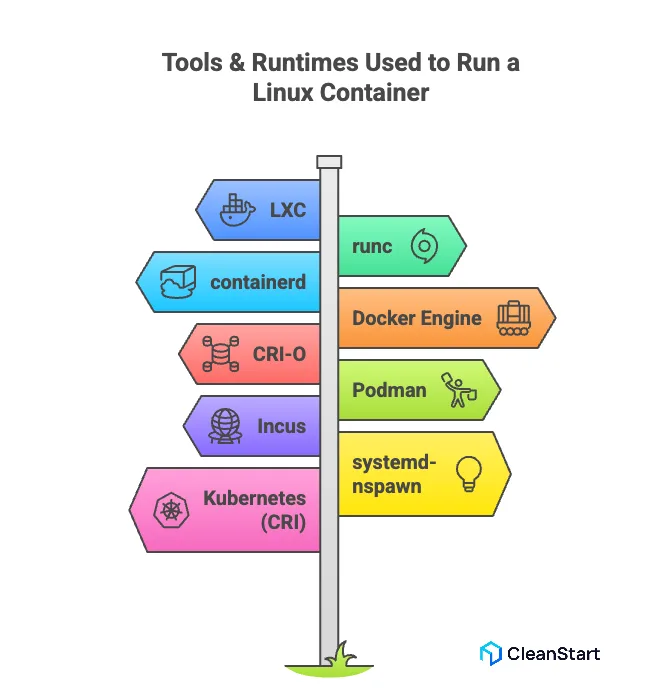
Several tools and runtimes are used to run a Linux container, each built on top of Linux namespaces, cgroups, and OS-level isolation. At the low level, Linux containers rely on lightweight runtimes that execute container processes directly on the host kernel, while higher-level tools provide image management, orchestration integration, and developer-friendly workflows.
Key tools and runtimes used to run a Linux container:
- LXC – A system-level container manager that provides full Linux userspace environments.
- runc – The default OCI-compliant low-level runtime used by Docker, Kubernetes, and other platforms to start containers.
- containerd – A high-level container runtime that manages images, snapshots, and lifecycle operations; commonly used underneath Docker.
- Docker Engine – Provides a complete workflow for building, storing, and running container images.
- CRI-O – A Kubernetes-focused runtime designed to run OCI containers efficiently in production clusters.
- Podman – A daemonless container engine that runs OCI containers and images, often used as a drop-in Docker alternative.
- Incus – A system container and VM manager built on LXC to provide advanced orchestration and remote container management.
- systemd-nspawn – A lightweight tool that runs containers in a namespace-isolated environment using systemd.
- Kubernetes (runtime interface) – Uses the Container Runtime Interface (CRI) to interact with runtimes such as containerd and CRI-O.
What is Docker in the Linux container ecosystem?
Docker in the Linux container ecosystem is a high-level platform that standardizes how applications are packaged, built, shipped, and executed using container images. It sits above low-level runtimes and provides a unified workflow that helps teams create and run isolated containers on the Linux kernel, making it the most widely adopted interface for developing and deploying containerized applications.
The following points explain Docker’s role in the Linux container ecosystem:
- Packaging layer – Builds reproducible container images that behave consistently across environments.
- Runtime layer – Uses an OCI-compliant engine to launch containers on Linux namespaces and cgroups.
- Developer workflow – Simplifies local builds, testing, and debugging with a unified CLI and tooling.
- Ecosystem integration – Acts as the standard image format used by orchestrators like Kubernetes and OpenShift.
- CI/CD alignment – Moves the same immutable image through dev, staging, and production pipelines.
- Unified interface – Provides a consistent way to work with container-based systems across any Linux distribution.
What are LXC and LXD in Linux container management?
LXC and LXD are two closely related technologies used in Linux container management. LXC is the low-level container framework that provides system-style containers using Linux namespaces and cgroups, giving each container its own userspace while sharing the host kernel. LXD builds on top of LXC as a higher-level manager that adds remote management, clustering, image handling, and a modern API-driven workflow, making it easier to deploy and operate system containers at scale.
The following points explain LXC and LXD in Linux container management:
- LXC – Provides the core mechanisms for creating and running system containers that behave like lightweight virtual machines.
- LXD acts as the management layer that uses LXC under the hood to simplify the container lifecycle covering creation, start, stop, snapshots, and deletion while also streamlining networking, storage, and clustering.
- API-driven operations – LXD exposes a REST API, enabling automation and integration with orchestration tools.
- Image management – LXD offers easier publishing, pulling, and managing of Linux container images.
- Scalable design – LXD supports multi-node clustering and remote hosts for centralized container management.
How do you secure a Linux container?
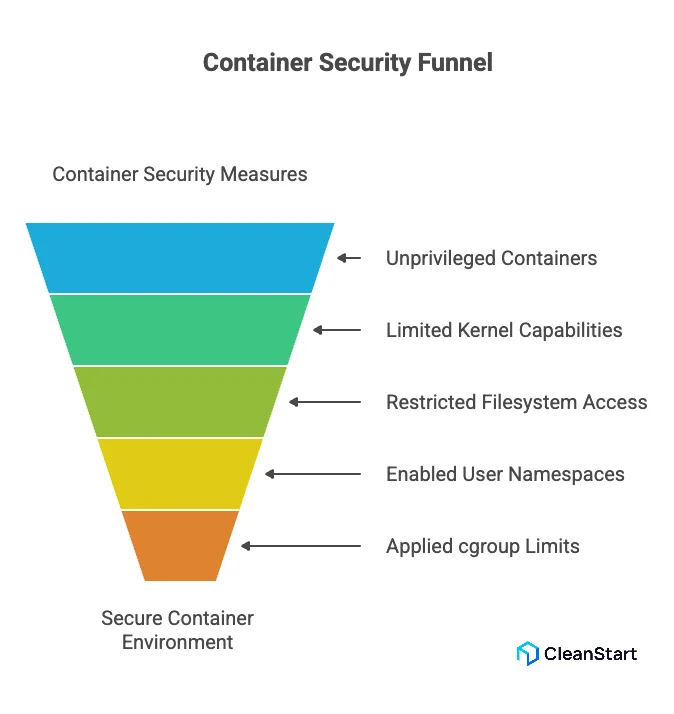
Securing a Linux container involves minimizing the permissions it has, controlling what resources it can access, and enforcing strict isolation so the container cannot affect the host or other workloads. Because containers share the host kernel, security depends on restricting capabilities, hardening the runtime environment, and ensuring the container image and configuration follow least-privilege principles.
The following points explain how to secure a Linux container:
- Use unprivileged containers – Avoid giving the container direct root access on the host.
- Limit kernel capabilities – Drop unnecessary capabilities so the container cannot perform high-risk operations.
- Restrict filesystem access – Mount sensitive paths as read-only or avoid mounting them entirely.
- Enable user namespaces – Map container users to non-privileged IDs on the host for safer isolation.
- Apply cgroup limits – Control CPU, memory, and I/O usage to prevent resource exhaustion attacks.
- Harden the network – Use isolated network namespaces, firewall rules, and dedicated bridges to contain traffic.
- Use minimal, trusted images – Reduce the attack surface by running only what is needed and verifying image integrity.
- Scan images regularly – Detect vulnerabilities early through automated container image scanning.
- Enforce runtime profiles – Apply AppArmor, SELinux, or Seccomp profiles to restrict system calls.
- Keep the host patched – Since containers share the kernel, host security directly affects container security.
Secure your Linux containers
Book a Demo Today!What isolation methods improve Linux container security?
Linux container security improves when you harden isolation between the container and the host at the kernel, filesystem, and network layers, so even if a process is compromised it has very limited impact outside its own sandbox.
The following isolation methods improve Linux container security:
- User namespaces and unprivileged containers – Map container root to non-root on the host so a breakout does not grant real root access.
- Linux namespaces – Isolate PIDs, network, mounts, IPC, and hostname so containers cannot see or tamper with host or peer processes.
- cgroups (control groups) – Limit CPU, memory, and I/O so a single container cannot exhaust host resources.
- Capability dropping – Remove high-risk Linux capabilities so even root inside the container has fewer powerful operations available.
- MAC profiles (AppArmor/SELinux) – Enforce strict per-container policies on what files, sockets, and devices can be accessed.
- Seccomp syscall filters – Block dangerous or unused system calls to shrink the kernel attack surface.
- Filesystem isolation – Use separate root filesystems, avoid mounting sensitive host paths, and prefer read-only or no-exec mounts.
- Network isolation – Place containers in separate network namespaces and control traffic with firewalls or service meshes.