



Container base-image terminology can be confusing. Terms such as "minimal," "distroless," and "hardened" are often used interchangeably, even though they describe different properties of a container image.
A minimal image generally means that unnecessary packages and files have been removed. A distroless image takes that further by removing common operating-system utilities such as shells and package managers from the runtime. A hardened image goes beyond the contents of the filesystem by adding security controls and assurance around how the image is built, maintained, and delivered.
Alpine is often part of this conversation because it is a small, general-purpose Linux distribution that is widely used as a container base. It is minimal compared with a traditional Linux distribution, but it is not distroless simply because it is small.
Understanding these differences matters because image size is only one part of container security. A smaller image can reduce attack surface, but it does not by itself tell you where the software came from, how it was built, whether it has been tampered with, or how vulnerabilities will be handled over time.
This guide breaks down the differences between distroless, Alpine, hardened, and general-minimal base images so you can choose the right foundation for your workloads.
Distroless: What's Actually Inside the Image
A distroless image contains an application and the runtime components it needs, without the general-purpose operating-system utilities normally found in a full Linux distribution.
That typically means no shell, no package manager, and no standard utilities such as ls, cat, or bash. The goal is straightforward: remove components that the application does not need at runtime.
This can reduce both image size and attack surface. It also limits what an attacker can do after gaining access to a running container. There is no shell to use for interactive exploration and no package manager to pull additional software into the container.
Distroless images are available in different variants, so there is no single distroless image size. A static image intended for a statically compiled application can be extremely small, while language-runtime variants for Java, Node.js, Python, and other ecosystems are larger because they include the required runtime.
The important distinction is therefore not simply size. Distroless is primarily a statement about what is absent from the runtime image.
There are operational consequences. Because a distroless image does not include a shell, commands that rely on shell interpretation cannot be used as the container's entrypoint. Containerized applications need to use the appropriate executable or exec-form entrypoint instead.
Debugging also requires a different approach. Teams cannot rely on simply opening a shell inside a running production container. Ephemeral debug containers, sidecars, Kubernetes debugging tools, logs, metrics, and other external observability mechanisms become more important.
Distroless can therefore be a strong choice for production workloads where a smaller runtime and reduced tooling are desirable, provided the development and operations teams have a suitable debugging model.
Alpine: The Minimal Distro That Keeps Its Shell
Alpine Linux takes a different approach.
Alpine is a small, general-purpose Linux distribution commonly used as a container base. It uses musl libc, includes the apk package manager, and provides BusyBox utilities and an interactive shell.
That makes Alpine convenient for developers. A team can start a container, open a shell, inspect the filesystem, install a package, and troubleshoot an issue without rebuilding the image.
Those same capabilities distinguish Alpine from distroless.
A shell and package manager increase the amount of functionality available inside the runtime container. If an attacker gains code execution, those tools can also provide additional options for reconnaissance, downloading software, or modifying the environment.
Alpine also introduces a compatibility consideration because it uses musl rather than glibc. Most applications work well with Alpine, but some software and prebuilt binaries depend on glibc behavior or libraries. Native extensions, language runtimes, locale handling, and third-party binaries can therefore require additional testing.
The important point is that Alpine is small, but small does not mean distroless or hardened.
Alpine can be used as the foundation for a hardened image, but the Alpine distribution itself does not automatically provide the security assurance associated with a hardened image.
Hardened: More Than a Smaller Filesystem
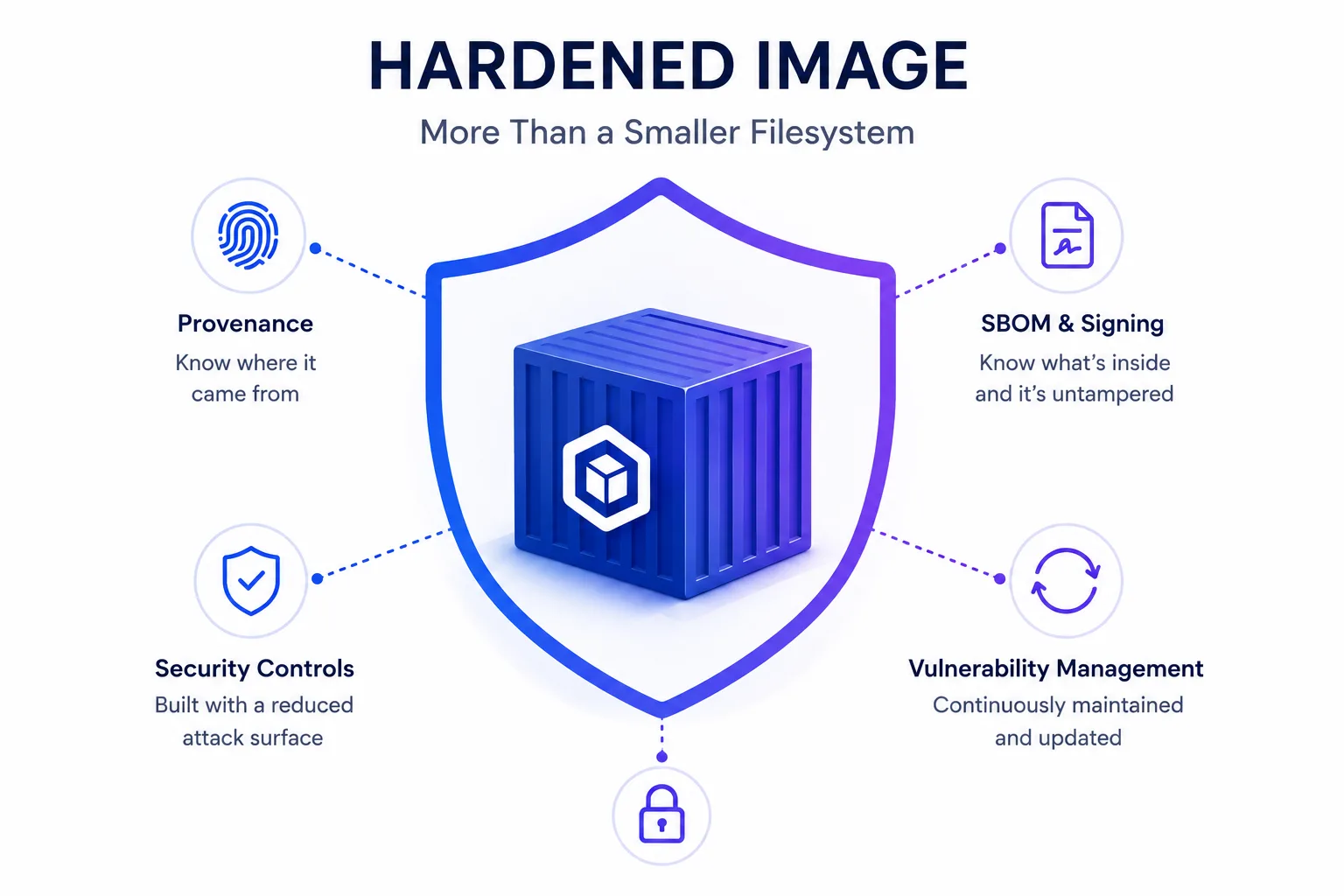
"Hardened" is the term that requires the most care because there is no single filesystem characteristic that makes an image hardened.
A hardened image typically starts with a reduced attack surface, but it also applies security controls and operational practices around the image. Depending on the provider and use case, these can include running as non-root, removing unnecessary capabilities, providing an SBOM, signing artifacts, publishing provenance, maintaining defined vulnerability-remediation processes, and supplying compliance evidence.
A distroless image can tell you that a shell and package manager are absent. A hardened image should give you a broader set of assurances about the artifact and its lifecycle.
Two images can contain a similar set of runtime files while having very different supply-chain properties. One might be assembled from prebuilt binaries obtained from several upstream sources. Another might be rebuilt from source through a controlled build process, accompanied by an SBOM and cryptographic provenance, and continuously rebuilt as vulnerabilities are addressed.
The final filesystem may look similar. The assurance around the artifact is not.
CleanStart is one example of a hardened container image provider. Its hardened images are built from source and designed to combine a reduced runtime footprint with security controls such as SBOMs, provenance, vulnerability management, and compliance-oriented options.
The distinction is therefore worth remembering:
Minimal describes what has been removed.
Distroless describes the runtime shape.
Hardened describes the security controls and assurance applied to the artifact.
A hardened image does not have to be the absolute smallest image available. Its value comes from reducing unnecessary attack surface while giving the organization stronger evidence that the software it deploys can be understood, maintained, and verified.
For a practical look at where hardened images enter the software delivery process, see Where Do Hardened Container Images Fit in Your CI/CD Pipeline?.
Minimal Base Images: What Does "Minimal" Actually Mean?
"Minimal" is the broadest term in this discussion because it does not describe one specific image design. In general, a minimal base image removes unnecessary packages, files, and utilities compared with a fuller Linux distribution. How much is removed depends on the image and its intended use.
Alpine is commonly described as a minimal base image, as is Debian-slim. Both are smaller than their full distribution counterparts, but they still retain operating-system functionality that a distroless image removes. A minimal image may include a shell, package manager, standard utilities, libraries, documentation, or locale data depending on how it was built.
That makes "minimal" a relative description rather than a security guarantee. An image can be minimal without being distroless, and it can be small without being hardened. When evaluating a minimal base image, look at what has actually been removed, what remains in the runtime, how the image is maintained, and whether it provides the security controls your workload requires.
The practical takeaway is simple: minimality is about reducing unnecessary content, not defining a specific security posture. A team choosing a minimal base image should therefore evaluate more than image size and consider compatibility, debugging requirements, vulnerability management, and the level of security assurance needed for the workload.
Comparison Table: Distroless vs. Alpine vs. Hardened vs. General Minimal
Dimension | Distroless | Alpine | Hardened | General Minimal (Debian-slim, etc.) |
Primary goal | Remove unnecessary runtime tooling | Provide a small general-purpose Linux distribution | Reduce attack surface while adding security assurance | Reduce size and unnecessary packages |
Has shell? | No | Yes | Usually no at runtime | Usually yes |
Has package manager? | No | Yes, apk | Usually no at runtime | Usually yes |
Runtime utilities | Minimal | BusyBox and standard utilities | Reduced, depending on implementation | Retained to varying degrees |
libc | Depends on the variant | musl | Depends on the base | Typically glibc |
Typical size | Can range from very small static images to tens of MB for language runtimes | Small base footprint | Often comparable to minimal or distroless runtimes | Smaller than a full distribution |
SBOM / signing / provenance | May be available depending on provider | Not inherent to Alpine itself | Typically part of the security offering | Not inherent |
Vulnerability management | Depends on the maintainer | Depends on the maintainer | Defined as part of the image lifecycle | Depends on the maintainer |
Compliance evidence | Not typically inherent | No | Often available for compliance-oriented offerings | Not inherent |
Best fit | Production workloads with mature debugging practices | Teams that need a small image and in-container tooling | Organizations that need reduced attack surface plus security and compliance assurance | General-purpose workloads where traditional distro tooling remains useful |
Size Isn't the Whole Security Story
A smaller container image generally contains fewer components, which can reduce attack surface and simplify vulnerability management. But image size alone does not establish security. A container still depends on the software included in its userspace, so its security also depends on how those components are selected, maintained, updated, and delivered. A minimal image can contain fewer packages than a full distribution but still include software that needs to be monitored and updated. Similarly, a distroless image can remove the shell and package manager, reducing the tools available inside the runtime, while still depending on the maintenance practices of its image provider.
A hardened image takes this a step further by combining a reduced attack surface with additional security controls and maintenance practices. When evaluating a hardened or minimal base image, teams should look beyond its size and ask what is included, how the image is maintained, how vulnerabilities are addressed, and what security evidence the provider makes available. Two images can have similar contents and similar sizes while having very different security and maintenance profiles.
This is the key distinction between the approaches. Minimality can reduce what is present in the image, while hardening adds security controls around the image and its lifecycle. The goal is therefore not simply to choose the smallest image available, but to choose an image whose contents, maintenance model, and security characteristics match the requirements of the workload.
For a broader discussion of how minimal, hardened, and secure images differ, see Minimal vs. Hardened vs. Secure Container Images: What's the Difference and Why It Matters.
Which One Fits Your Team
Choose a minimal image when your primary objective is to reduce unnecessary packages and image size, but you still need conventional Linux tooling.
Choose Alpine when you want a small Linux distribution with a shell and package manager and your applications are compatible with musl.
Choose distroless when you want to remove runtime tooling such as shells and package managers and your team has an appropriate debugging and observability strategy.
Choose a hardened image when reducing the runtime attack surface is only part of the requirement and you also need stronger assurance around the artifact, including vulnerability management, SBOMs, signing, provenance, or compliance evidence.
For teams adopting hardened images, the transition does not necessarily require redesigning the entire CI/CD pipeline. A hardened base image can become the starting point for the existing build process, allowing downstream scanning, policy enforcement, signing, registry controls, and runtime controls to continue doing their jobs.
For a concrete workload-level comparison, see Official Go Docker Image vs. CleanStart Hardened Go Image.
The Bottom Line
Minimal, distroless, Alpine, and hardened images are not interchangeable terms. A minimal image reduces unnecessary components compared with a fuller distribution, while a distroless image removes common runtime tooling such as shells and package managers. Alpine takes a different approach by providing a small Linux distribution that still retains the shell, package manager, and other utilities developers may need. Hardened images build on the reduced-attack-surface approach by adding security controls and maintenance practices around the image.
The right choice ultimately depends on the workload and the level of control your team needs. If you need a small general-purpose base with familiar Linux tooling, Alpine or another minimal distribution may be appropriate. If you want a stripped-down production runtime, distroless is often a strong fit. If you need a production image with additional security, vulnerability-management, and compliance assurance, a hardened image is the better choice. The goal is not simply to choose the smallest image, but to choose a base image that provides the right balance of size, compatibility, operational flexibility, and security for your environment.