A Practical Guide to Shifting Left with CleanStart
Most organizations agree that container security should start earlier in the software delivery lifecycle.
But when teams try to operationalize that goal, they often run into a practical question:
Where exactly do hardened container images fit inside an existing CI/CD pipeline?
Many teams assume adopting hardened images means replacing tooling, redesigning delivery workflows, or slowing engineering velocity.
In reality, most organizations do not need to replace their CI/CD platform. They need to improve the artifact flowing through it.
That is where CleanStart fits.
CleanStart helps teams start with cleaner, verifiable, lower-risk container images so security begins during image creation, not after risky artifacts are already moving through the pipeline.
This guide explains how to integrate CleanStart hardened images into common CI/CD workflows using GitHub Actions, Jenkins, and GitLab CI.
The Simplest Mental Model
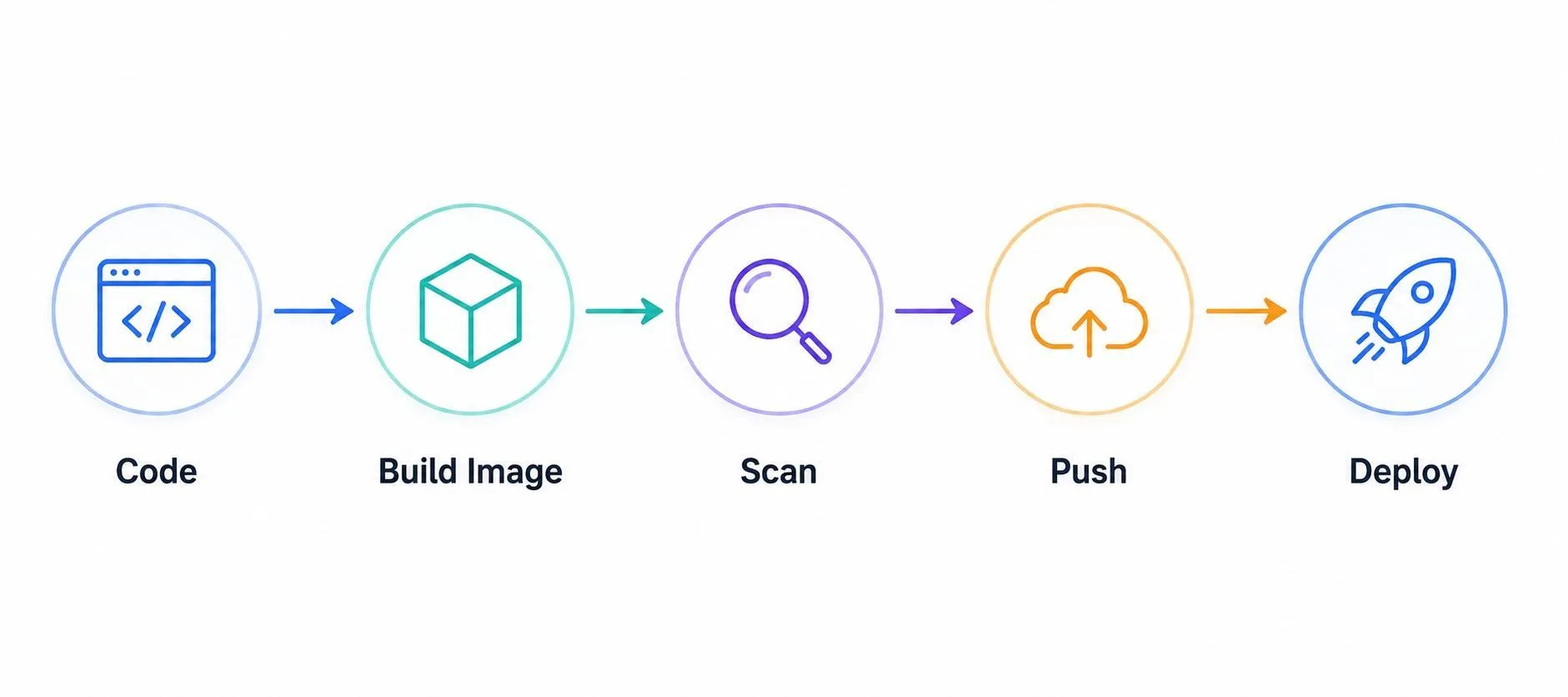
Traditional pipelines often treat security as something added after a build is complete.
Typical model:
A stronger model is:
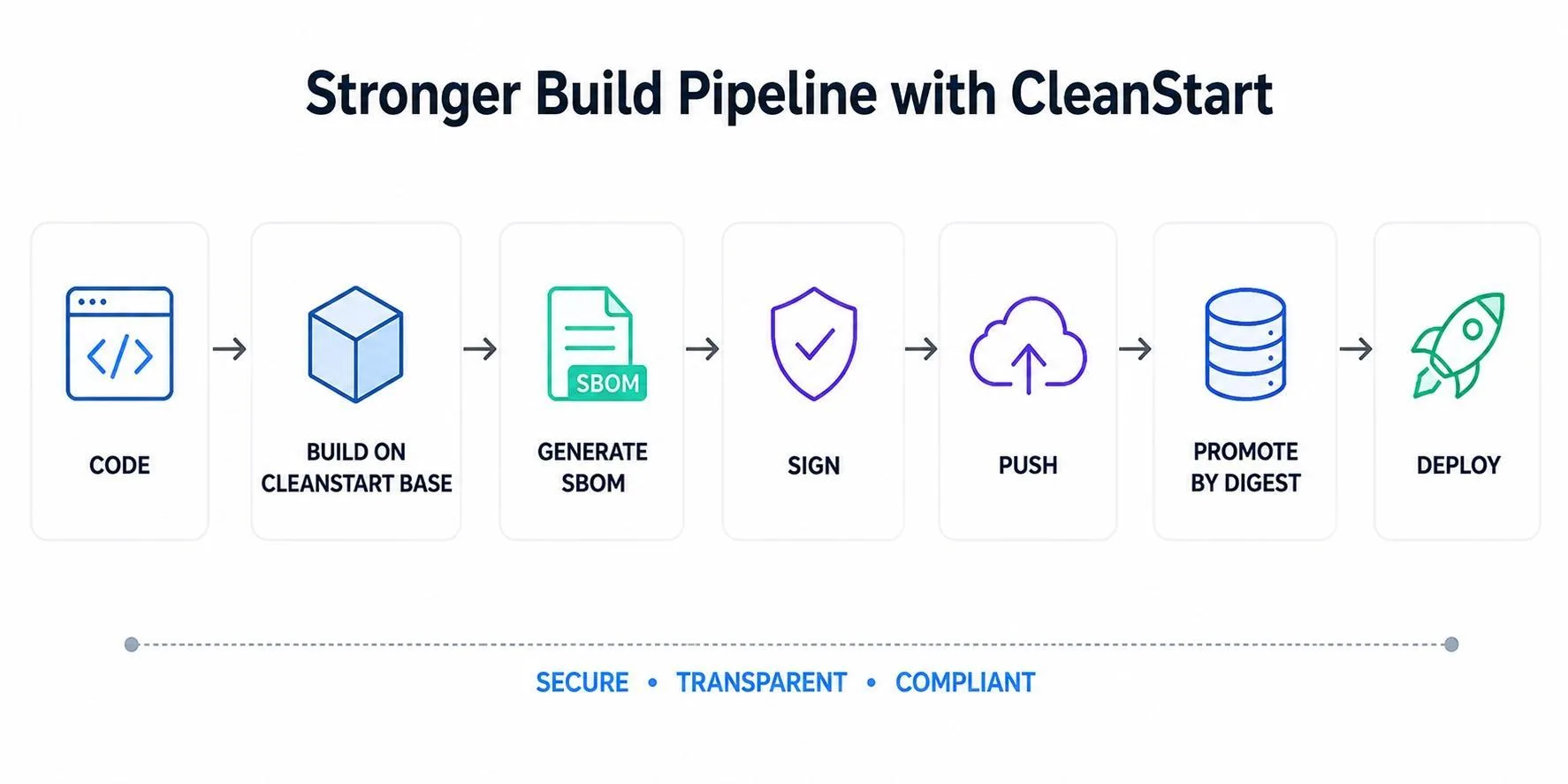
This changes one critical assumption.
Instead of creating a generic image and inspecting it later, teams produce a hardened artifact from the start.
That means scanners, policies, and runtime controls can focus on meaningful risk rather than inherited noise.
Where CleanStart Typically Fits
There are three common insertion points.
1. Replace the Base Image
Instead of building on generic upstream images, teams use a CleanStart trusted hardened base image.
This is usually the fastest path to adoption.
2. Rebase Existing Images
If current application builds must remain unchanged, some teams keep their build stage intact and rebase onto a hardened runtime image later in the pipeline.
3. Standardize Golden Images
Platform teams can publish internally approved CleanStart images for engineering teams to consume across services.
This improves consistency and governance.
Before and After: What Adoption Often Looks Like
Before
FROM alpineRUN apk add bash curlCOPY app/appCMD ./start.sThis pattern often leaves runtime images carrying package managers, shells, and utilities not required by the application.
After
FROM cleanstart/runtime-baseCOPY --chown=65332:65332 app/appENTRYPOINT ["app"]The runtime image focuses on running the application, not preserving a general-purpose operating environment.
Before
FROM pythonCOPY main.pyRUN chomd +x main.pyCMD ["python", "main.py"]This pattern often leaves runtime images carrying package managers, shells, and utilities not required by the application.
After
FROM cleanstart/pythonCOPY main.pyENTRYPOINT ["python3"]CMD[main.py]Example CI/CD Flow with CleanStart
A practical hardened image pipeline often looks like this:
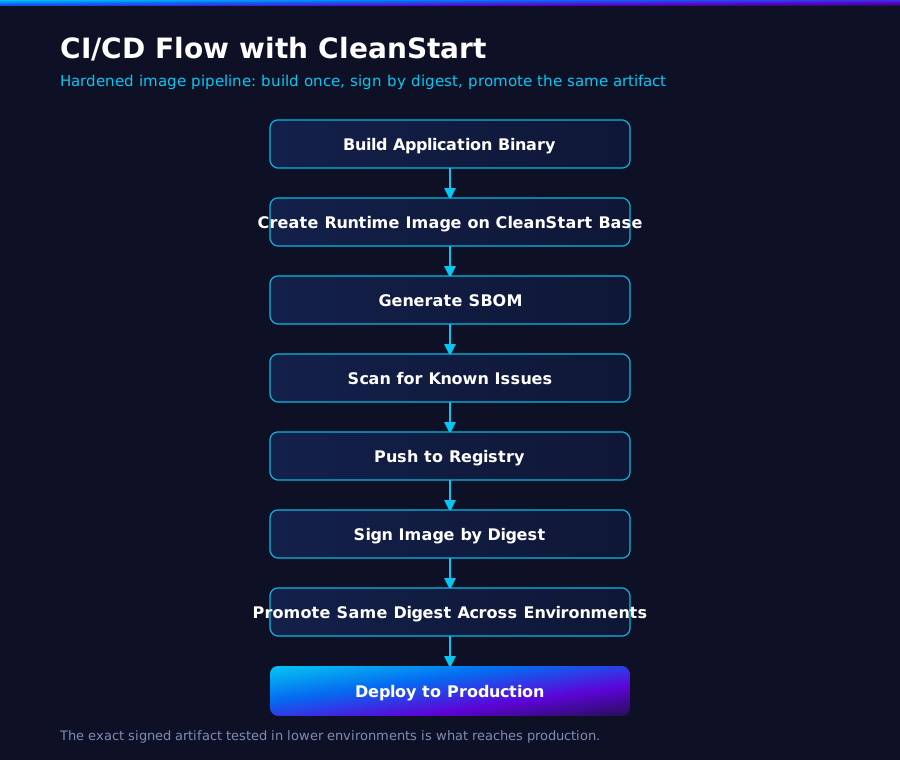
This approach improves trust because the exact signed artifact tested in lower environments is what reaches production.
GitHub Actions Example
A GitHub Actions workflow can adopt CleanStart with minimal changes.
name: Build Secure Container on: push: branches: [main] jobs: build: runs-on: ubuntu-latest steps: - uses: actions/checkout@v4 - name: Build image run: docker build -t myapp:${{ github.sha }} . - name: Generate SBOM run: syft myapp:${{ github.sha }} - name: Scan image run: trivy image myapp:${{ github.sha }} - name: Sign image run: cosign sign myapp:${{ github.sha }} - name: Push image run: docker push myapp:${{ github.sha }} Where CleanStart Is Applied
The Dockerfile uses a CleanStart base image. The CI workflow itself remains familiar.
That means security improves without replacing GitHub Actions.
Jenkins Example
Enterprises running Jenkins can integrate hardened images into existing pipelines with limited change.
pipeline { agent any stages { stage('Checkout') { steps { git 'https://repo-url' } } stage('Build') { steps { sh 'docker build -t myapp:$BUILD_NUMBER .' } } stage('Validate') { steps { sh 'trivy image myapp:$BUILD_NUMBER' } } stage('Push') { steps { sh 'docker push myapp:$BUILD_NUMBER' } } } } Again, the key shift is the image foundation, not the CI system.
GitLab CI Example
GitLab CI users can follow the same model.
stages: - build - validate - push build: stage: build script: - docker build -t registry/myapp:$CI_COMMIT_SHA . validate: stage: validate script: - trivy image registry/myapp:$CI_COMMIT_SHA push: stage: push script: - docker push registry/myapp:$CI_COMMIT_SHA Security starts earlier while delivery workflows stay intact.
What Usually Needs Refactoring
Most migrations are straightforward, but some runtime assumptions need cleanup.
Shell Startup Scripts
Replace shell-based startup logic with direct application entrypoints.
Runtime Package Installation
Move package installation to build stages rather than production runtime containers.
Local Temporary Writes
Use mounted volumes or tmpfs locations for applications that expect writable storage.
Interactive Debug Habits
Use modern debugging patterns instead of relying on production shell access.
These changes often improve operational discipline beyond security alone.
What About Debugging Without a Shell?
This is one of the most common engineering concerns.
Shell-less production containers do not eliminate troubleshooting options.
Modern teams commonly use:
- Ephemeral debug containers
- Sidecar diagnostics containers
- Centralized logs and traces
- Metrics and observability platforms
- Reproducible lower-environment troubleshooting images
Production workloads do not need to function as debugging workstations.
Example Kubernetes Runtime Controls
For teams deploying to Kubernetes, hardened images are commonly paired with workload-level runtime controls such as:
securityContext: runAsNonRoot: true readOnlyRootFilesystem: true allowPrivilegeEscalation: false This helps ensure the runtime environment aligns with the hardened image design.
What Changes for Developers
In many implementations, very little.
Developers usually continue to:
- Commit code normally
- Use existing CI/CD tools
- Push to the same registries
- Deploy through Kubernetes or existing release processes
The difference is that applications run on a cleaner image foundation.
Teams commonly report fewer inherited packages, reduced scanner noise, and cleaner remediation queues because unnecessary runtime components are removed earlier in the lifecycle.
What Changes for Security Teams
Security teams gain stronger upstream controls.
Instead of only asking:
- Did the scan pass?
- Was policy enforced?
- Is runtime monitoring active?
They can also ask:
- Was the image built from a trusted hardened base?
- Is shell access removed where unnecessary?
- Is read-only filesystem compatible?
- Is the image signed and traceable?
- Is the same digest promoted through environments?
That is a stronger shift-left posture.
CleanStart Architecture Advantages in CI/CD
CleanStart can strengthen pipelines through controls such as:
BusyBox Replacement with CleanStart_Util
Instead of inheriting broad utility layers, images can include only the components required by the workload.
Shell-Less Runtime Design
Removes common post-compromise execution paths.
Trusted, Reproducible Build Foundations
Supports stronger software supply chain confidence through immutable digests, signed promotion workflows, and artifact traceability.
A Smart Rollout Strategy
Most organizations should not migrate everything at once.
Start with:
- Internet-facing workloads
- New microservices
- High-compliance applications
- Frequently deployed services
- Shared platform base images
This creates measurable wins quickly while reducing migration risk.
Final Thought
You do not need to replace GitHub Actions, Jenkins, or GitLab CI to shift left.
You need to improve what moves through them.
These platforms already know how to build, validate, and ship containers. CleanStart helps ensure those containers begin cleaner, more predictable, and lower risk.
If your pipeline only checks images after creation, security is arriving late.
The fastest path to shift left is to start with a hardened image.