Environment variables control how software runs across environments. This article covers what they are, where they are set, how they differ across operating systems, when to use them instead of config files, and practical troubleshooting.
What Are Environment Variables?
Environment variables are name–value pairs that an operating system uses to pass configuration details to executables, scripts, and APIs without hard-coding those values in code. They matter because they provide a central, consistent, and secure way to configure how applications behave across environments such as development, testing, and production, including scenarios where a container image relies on externally supplied settings to run predictably in different deployments.
Why Do They Matter?
Environment variables matter because they make software more predictable, secure, and maintainable. They allow developers to configure behavior dynamically, ensure consistent paths and directory references, and enable the operating system to mediate how applications access external resources.
What is the purpose of using environment variables?
The purpose of using environment variables is to give an operating system a flexible way to configure how executables, scripts, and APIs behave without editing source code or modifying a configuration file. They act as a centralized layer where parameters are defined once and inherited by any process that needs them.
Explore CleanStart Images
for trusted, production-ready containers.
How Environment variables work?
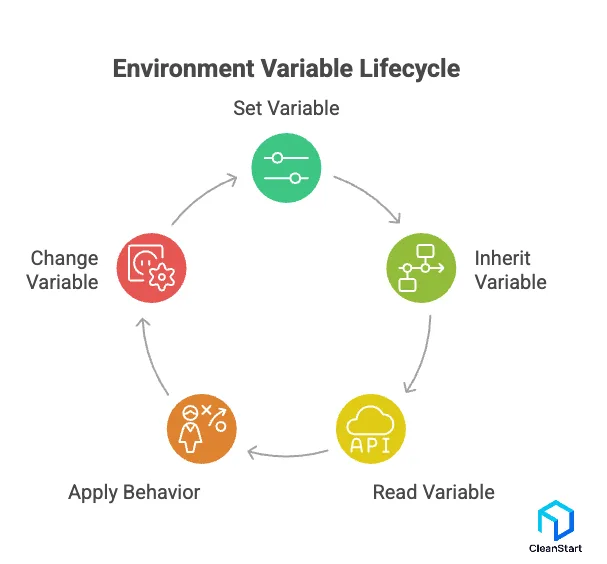
Environment variables work by passing key–value strings from the operating system into a process at startup. The application reads those values to decide behavior without changing code.
The following points are related to how environment variables work.
- They are stored by the OS or a shell, not inside your program
Examples include user-level variables, system-level variables, and session variables created in a terminal. - They are inherited at process creation
When you run a program, the OS creates a new process and copies the parent process’s environment into it. Child processes inherit the environment unless you override it. - They are read by applications through standard OS APIs
Apps query variables by name (for example, PATH, HOME, NODE_ENV) and use the returned value if it exists. - Scope depends on where you set them
- Session-only: set in a terminal and exist until that terminal closes.
- User-level: persist for one user across sessions.
- System-level: apply to all users and services on the machine.
- Precedence is usually “closest wins”
A variable set for a specific process or session typically overrides a user-level variable, which overrides a system-level variable, depending on OS and tooling. - They affect behavior in predictable places
Common uses: selecting environment (dev vs prod), configuring endpoints, toggling features, providing credentials (prefer secret managers), and controlling toolchains (compilers, runtimes, CLIs). - They can be changed for new processes, not retroactively for already running ones
Changing an environment variable in your shell affects programs you start afterward. Running processes keep the environment they started with, unless the application supports reloading its own config. - They are plain text and can leak
They can appear in logs, crash dumps, process inspection tools, or CI output. Use least privilege and secret handling practices for sensitive values.
How Do You Set and Use Environment Variables?
You set and use environment variables by defining name–value pairs that the command line, CLI tools, and applications can retrieve at runtime. On Linux, the common method is to set environment variables in the shell using the correct syntax and then export them so child processes can access the variables defined in the current session, a workflow especially important in containerization where runtime configuration must be injected rather than baked into the image.
You use environment variables by referencing their names inside programs, scripts, or API calls. The system resolves the reference at runtime, allowing the application to adapt without modifying its internal syntax. This approach ensures that configuration remains external, predictable, and easy to update across development, staging, and production environments, including workloads running under cgroups where resource controls are applied independently of application-level settings.
When should environment variables be used instead of configuration files?
Environment variables should be used instead of configuration files when applications need dynamic, externally managed settings that change across environments without altering source code. They are the preferred option when deployments require fast overrides, when secrets must stay out of version control, or when a platform such as a container orchestrator injects values at runtime using standardized environment variable names containing lowercase letters.
Use environment variables instead of configuration files when:
- Deployment environments differ and values must be swapped without editing files.
- Sensitive credentials should not be stored in repositories.
- Containers or serverless platforms supply configuration through injected variables.
- CI/CD pipelines need lightweight, ephemeral configuration controlled outside the codebase.
Environment variables are the better choice when external, runtime-driven behavior is required and when configuration must remain flexible, secure, and environment-specific.
What Are Examples of Environment Variables Across Different Systems?
Examples of environment variables differ across operating systems because each platform exposes its own set of environment variables for user environments, system settings, and command-line workflows, and these same variables can also influence how a container entrypoint initializes and configures an application at startup.
- PATH (Unix/Linux/Windows): Colon-separated list of directories used to locate an executable file; overrides the value inherited from the parent environment.
- HOME (Unix/Linux): Path to the user’s home directory used by applications for storing configuration files.
- USER / LOGNAME (Unix/Linux): Identifiers set at the user’s login; used to personalize program behavior.
- SHELL (Unix/Linux): Defines which command processor interprets syntax and command-line parameters.
- LANG / LC_ (Unix/Linux):* Locale variables that control language, region, and encoding formats.
- PWD (Unix/Linux): Stores the current working directory for shell and utility operations.
- EDITOR / VISUAL (Unix/Linux): Specifies which editor programs should launch by default.
- TEMP / TMP (Windows): Directories used to store temporary files for user and system operations.
- APPDATA (Windows): Directory for roaming application data used by Windows applications.
- PATHEXT (Windows): Defines which file extensions are treated as executable files.
- BROWSER (Unix/Linux): Indicates the preferred browser for opening URLs.
- IFS (Unix shells): Controls how the shell splits words during parsing.
- ENV (Unix shells): Points to a shell startup file loaded using setenv or affected by unset.
- OLDPWD (Unix/Linux): Stores the previous working directory for quick retrieval.
What are the Key Characteristics of Environment variables?
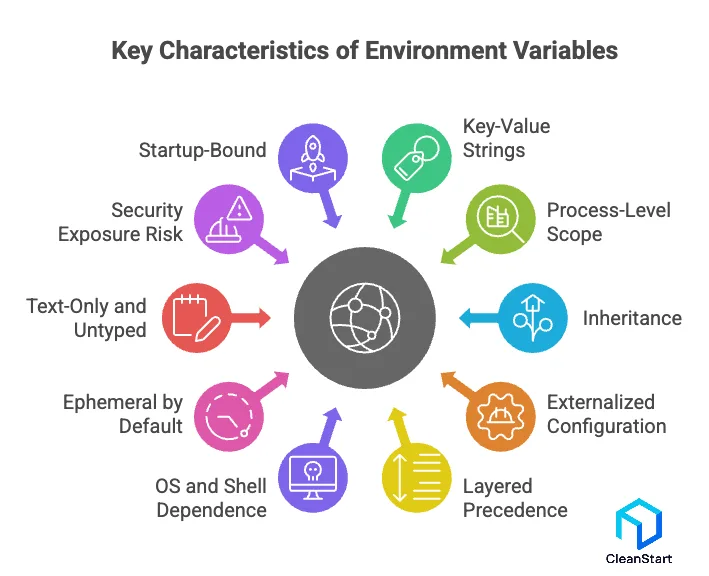
Environment variables are process-scoped configuration values provided by the OS and inherited by child processes.
The key characteristics of environment variables are:
- Key–value strings: Stored as name/value pairs (text), typically NAME=value.
- Process-level scope: Visible to a running process and, by default, its child processes.
- Inheritance: Child processes inherit the parent’s environment unless explicitly overridden.
- Externalized configuration: Change behavior without changing code or rebuilding binaries.
- Layered precedence: Values can be set at session, user, and system levels; the most specific context usually wins.
- OS and shell dependent: Syntax, persistence, and management differ across Windows, Linux, and macOS.
- Ephemeral by default: Session-set variables vanish when the session ends unless persisted in profiles or system settings.
- Text-only and untyped: Applications must parse and validate (numbers, booleans, lists).
- Security exposure risk: Can leak via logs, crash reports, process inspection, or CI output; secrets need careful handling.
- Startup-bound: Most applications read them at start; changes typically require restarting the process to take effect.
How Do Environment Variables Differ Across Operating Systems?
Operating System | How Variables Are Defined | Naming & Syntax | Inheritance & Execution | Key Characteristics |
Unix / Linux | NAME=value and export to set this variable for a new environment. | Lowercase variable names common; PATH contains a colon-separated list. | Exported variables pass to child processes; non-exported variables stay local. | Search path resolution depends on the shell; variable is not set → undefined. |
Windows | Defined via Control Panel, command line (set, setx), or registry updates. | Case-insensitive; semicolon-separated paths; empty string still considered defined. | Inheritance depends on parent process; registry stores persistent values. | Corresponding environment variable may override default path or full path rules. |
macOS | Follows Unix syntax; variables exported through shell or plist startup files. | Same naming conventions as Unix; POSIX rules for special characters. | GUI apps may not inherit shell variables; command line behaves like Linux. | Hybrid model using both shell profiles and launchd configuration. |
Cross-Platform | Variables defined externally to configure programs without code changes. | Syntax and allowed characters vary by OS. | Propagation rules differ across shells and systems. | Environment variables provide portable configuration for command shells and CLIs. |
How Are Environment Variables Used in Development Tools and Programming Languages?
Environment variables are used in development tools and programming languages to supply external configuration that programs can read at runtime without modifying code. They allow tools to load credentials, file system paths, feature flags, and environment modes through variables defined outside the application, ensuring predictable behavior across a specific environment such as development, staging, or production, including scenarios where a container runtime injects configuration at startup.
Most languages expose APIs that retrieve environment variables directly. A single variable can be used to set a port number, choose a runtime mode, or locate a configuration file. When the value is set externally, the effect on the system is immediate because the program reads the new variable on startup rather than relying on embedded defaults, which is especially useful when pulling images or credentials from a container registry.
Environment variables appear in:
- Build tools that compile code using values from variables instead of hard-coded paths.
- Web frameworks that load secrets or API keys as environment variables defined at deployment time.
- CLIs that adjust behavior based on environment flags passed through the command line interface.
- Browser environment simulators where tools map environment variables into supported runtime formats.
Development tools use environment variables because they provide a reliable, code-independent way to convey configuration, reduce coupling between environments, and make programs that need dynamic information easier to deploy and maintain, especially when workflows generate or consume an SBOM that requires environment-specific metadata.
Configure environments right.
Book a CleanStart demoWhat Are Pseudo-Environment Variables and When Are They Used?
Pseudo-environment variables are system-generated values that behave like environment variables but are not part of the normal user environment variables or the inherited environment block. They are created by the shell or command processor at runtime to expose contextual details—such as the current directory, script metadata, or system state—without requiring the user to define an environment variable manually.
You use pseudo-environment variables when:
- A shell script must reference its own location or prefix path.
- Programs need execution context variables instead of static configuration settings.
- A command processor must expand a value on demand using a command line.
- A path environment variable is insufficient for the use case because the value of an environment variable must change dynamically.
Pseudo-environment variables matter because they give shells and command processors a precise way to supply runtime information that regular environment variables and their values cannot express, ensuring scripts and utilities operate reliably without requiring manual variable settings.
How Can You Troubleshoot and Manage Environment Variables?
You troubleshoot and manage environment variables by verifying how they are defined, how their values are provided to the process, and how tools interpret them at runtime. In a Linux system, this often begins by checking whether variable names containing lowercase letters follow shell conventions and whether variables contain the expected configuration variables needed by the application.
You can inspect variables using the shell’s built-in commands to confirm whether a value is provided, whether a variable is exported, or whether the size of the environment has exceeded limits that affect how programs are used to run. When a program fails to locate a resource, you confirm whether the path to the directory is correct or whether an environment variable instead is pointing to a stale or missing location.
Troubleshooting steps commonly include:
- Checking if a variable exists and whether the value is provided correctly.
- Verifying that variable names containing lowercase letters are recognized by the shell, since naming rules differ across environments.
- Ensuring configuration variables point to valid paths or dependencies.
- Inspecting command line parameter behavior when a variable overrides a tool’s default settings.
- Reviewing whether environment inheritance issues prevent child processes from receiving expected variables.