



A hardened container image is a base image deliberately reduced and locked down to lower its attack surface, then maintained as a security-controlled artifact over its whole life. It removes packages and runtime utilities an application doesn't need, and adds controls around vulnerability management, provenance, signing, and rebuilds.
The distinction that trips people up: a smaller image is not automatically a hardened one. Minimal and distroless approaches cut what's inside a container. Hardening goes further, it also governs how the image is built, maintained, updated, and verified. This guide covers what makes an image hardened, how hardened differs from minimal and distroless, why the model matters now, how the market has shifted, and what to evaluate when you choose a provider.
What makes a container image hardened?
A hardened image is built with security and operational constraints in mind from the start. Instead of taking a general-purpose Linux distribution and chasing vulnerabilities out of it after the image is already in your workflow, hardened approaches reduce unnecessary runtime components up front and set up controls to keep the image maintained.
There's no single filesystem property that makes an image hardened. A hardened image may be minimal or distroless, but hardening is broader than image size or the absence of a shell. It covers the contents of the image, how those contents are built and maintained, how vulnerabilities get addressed, and what evidence exists about the resulting artifact.
Four practices commonly separate hardened images from conventional base images.
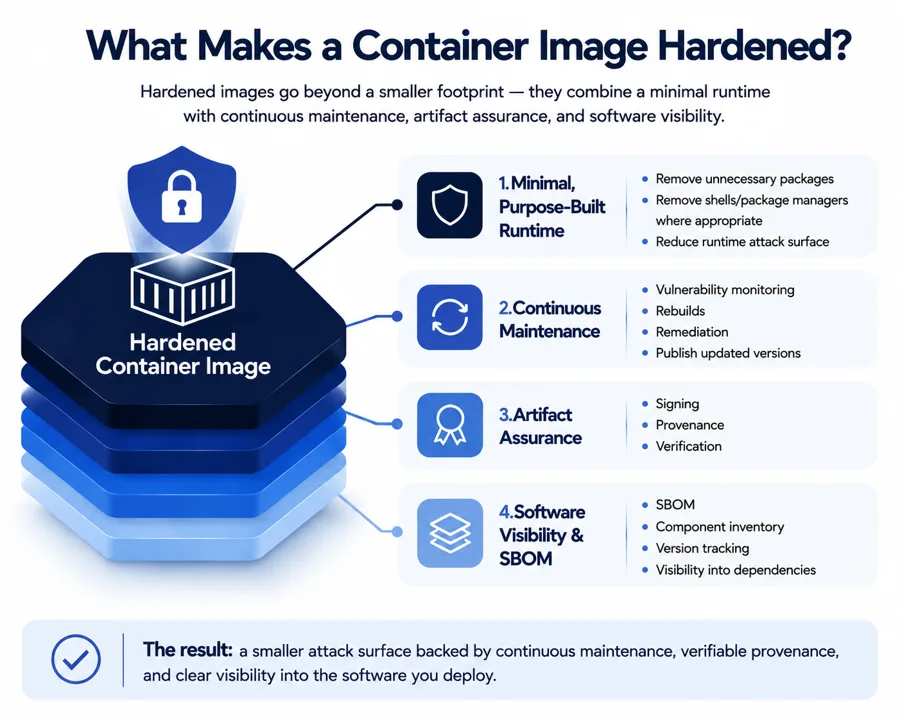
Minimal, purpose-built base layers
Hardened images generally remove components an application doesn't need at runtime: package managers, shells, compilers, debugging utilities, documentation, unused libraries. Fewer components means a smaller attack surface and an image that's easier to reason about.
Different projects reach that reduction differently. Distroless images remove general-purpose operating-system tooling and keep the application plus the runtime it needs. Other approaches build minimal images from existing distribution packages, or use purpose-built foundations designed specifically for container workloads.
Minimality is only one part of hardening. Removing a shell or package manager limits what an attacker can use after they get into a container, but it says nothing about how the remaining software was built, how vulnerabilities will be handled, or whether the artifact can be verified.
Continuous scanning and rebuilding
A hardened image is not a one-time exercise. The software inside it keeps changing, and new vulnerabilities get disclosed after an image is published. Maintaining a hardened image means monitoring its components, assessing newly disclosed vulnerabilities, rebuilding affected images, and publishing updated artifacts.
The speed and consistency of that process is what matters. A vendor can publish an image with a low vulnerability count at release, but that baseline shifts as new issues surface. The more useful question is what happens next: how quickly are affected components identified, how quickly is the image rebuilt, and how reliably does the fixed artifact move through release. That's the clearest line between an image that was hardened once and an image maintained as a security-controlled artifact.
Cryptographic signing and provenance
Hardened images may include cryptographic signing and build provenance for stronger assurance about what's being deployed.
Signing lets a consumer verify that an image was signed by the expected publisher and hasn't been altered since. Provenance answers a different question: how the artifact was produced and what build process generated it. These aren't interchangeable. A signature establishes integrity and publisher identity; provenance describes origin and build process. Together they give security and platform teams more evidence than an image tag alone, and for teams enforcing policy in CI/CD or at the registry, that evidence can feed an admission or deployment decision.
Software Bill of Materials (SBOM)
An SBOM is an inventory of the software components in an image, packages, libraries, and their versions. That inventory makes it much faster to determine whether a newly disclosed vulnerability affects something you've deployed.
An SBOM's usefulness depends on its completeness, accuracy, format, and how tightly it's connected to the actual artifact. One generated once and left to go stale is worth less than one produced as part of a controlled build and release process. Treat an SBOM as part of the image's security and maintenance model, not a standalone checkbox.
Taken together, these four practices distinguish a hardened image from one that's simply smaller. A minimal image reduces packages; a distroless image removes general-purpose runtime tooling; a hardened image adds controls around the artifact and its lifecycle so the reduced runtime surface is backed by an ongoing security process.
Stripped-down vs source-built: a distinction worth understanding
There are two ways to arrive at a minimal, hardened base, and they aren't equivalent.
The common one is to strip down a general-purpose distribution. Start from Debian or Alpine, remove shells, package managers, and unused libraries until little remains. This genuinely reduces attack surface, and it's the approach behind most hardened images available today. But stripping doesn't change where the remaining packages come from. Whatever is left is still built from upstream binaries, so each of those packages is a vulnerability you inherit and wait on upstream to fix.
The other approach is to build the base from source. Instead of removing pieces from a distribution, you compile only the components the workload needs, in a controlled, verifiable build. There's no general-purpose distribution underneath to inherit from, so the image starts from a lower vulnerability baseline at the root rather than a smaller pile of the same upstream packages.
Both approaches can ship SBOMs, provenance, and signatures, and increasingly both do. So the useful question to ask a hardened-image provider is not whether it produces that metadata. It's how the base was built: stripped from an upstream distribution, or compiled from source. CleanStart takes the source-built approach, which is one way to keep inherited vulnerabilities low at the root; other providers strip trusted distributions and maintain them aggressively. Which trade-off fits depends on your workloads and how much of the lifecycle you want to own, covered below.
Why hardened images matter for container security
Hardened images turn generic open-source base images into secure ones with a smaller attack surface, fewer exploitable components, and clearer provenance across the supply chain. Container security covers images, runtimes, isolation boundaries, and dependencies, so starting from a hardened image strengthens your posture from the beginning rather than bolting it on later.
A hardened image usually begins from a minimal base and includes only the files and binaries the workload needs, which lowers the chance that an attacker can exploit an unused tool or library. Continuous scanning is part of the model: detecting known vulnerabilities, misconfigurations, and policy violations before deployment means only vetted images reach production, and security teams get visibility to prioritize what actually matters.
When images are built from source with SLSA-style controls, scanned continuously, and shipped with SBOM and VEX metadata, teams can quickly identify which CVEs are relevant and which aren't. Because a container runs the application inside an isolated environment, the security of the image directly determines how secure the running container is. In environments where most workloads run as containers, hardened images have become the baseline for keeping supply chains secure at scale.
Why the hardened-image model matters now
Hardened images are more relevant as software-supply-chain risk grows and teams look for a consistent way to establish a secure baseline.
Containers are built on layers of third-party software. A base image can pull hundreds of packages into an application before anyone writes a line of application code. Those components become part of your supply chain and can bring vulnerabilities, outdated dependencies, and runtime functionality the application never uses. The practical problem for security and engineering teams: vulnerabilities in those dependencies can't always be handled as individual remediation tickets after an image reaches production. The image itself has to be maintained as part of the security process, with a defined approach to monitoring, rebuilding, and releasing.
The risk is moving faster than manual remediation
The scale of the problem is what makes the maintenance model matter. Verizon's 2025 Data Breach Investigations Report found that third-party involvement in breaches doubled year over year, from 15% to 30%. Sonatype's 2026 State of the Software Supply Chain Report reported a sharp rise in malicious open-source packages through 2025. Software an organization didn't write itself still becomes part of what it deploys and operates.
Container base images sit directly in that dependency chain. If a base image is built once and left to individual application teams to monitor and patch, security depends on every team keeping the same discipline. A hardened-image model moves more of that responsibility into the build and maintenance process itself.
Hardening is showing measurable results
There's evidence that reducing unnecessary software and improving vulnerability management has a measurable effect. Sysdig's 2025 Cloud-Native Security and Usage Report found that critical- and high-severity vulnerabilities present at container runtime had fallen to under 6%, down from more than 75% in 2022.
That number isn't proof that every hardened image produces the same result, runtime exposure depends on image selection, application dependencies, patching practices, and deployment controls. What the trend shows is that organizations can materially reduce the vulnerability exposure of running workloads when security controls are applied before software reaches production.
The case for hardened images, then, isn't just that they're smaller or have fewer CVEs at release. The stronger argument is that they move security into the artifact itself: fewer unnecessary components, a known baseline, continuous maintenance, and evidence teams can use to decide what they deploy.
How the market has changed
The barriers to adopting hardened images have dropped. Teams now have more options, from open-source minimal and distroless foundations to managed hardened-image services. That flexibility makes the evaluation criteria more important, not less.
A notable shift came in December 2025, when Docker made its full catalog of more than 1,000 Docker Hardened Images free and open source under the Apache 2.0 license. Built on Debian and Alpine, the free tier ships with near-zero CVEs, SBOMs, SLSA Build Level 3 provenance, and cryptographic signatures. That moved a lot of baseline hardening from a paid feature to a widely available default, and it reset what teams can expect from a free starting point.
A free or open-source image is a strong start, but the image is only one part of the security model. You still need vulnerability monitoring, rebuilding, remediation, SBOM generation, signing, provenance, compatibility testing, and the operational effort to keep those processes running. Managed providers take on more of that lifecycle. Depending on your requirements, the value may come from faster remediation, documented commitments, compliance evidence, verified builds, or reduced engineering effort, rather than the image's initial vulnerability count.
The result is a broader set of choices and a sharper question: what level of assurance does your organization need, and how much of the image lifecycle are you prepared to run yourself?
Container image options to consider
The market now spans commercial providers, open-source projects, ecosystem-backed offerings, and repositories built for specific regulatory environments. They differ in how images are built and maintained, and in vulnerability remediation, compliance support, provenance, catalog coverage, and ongoing maintenance.
Rather than asking which vendor is best overall, evaluate which approach fits your workloads and operating model. A team that needs contractual remediation commitments and compliance evidence has different requirements from a platform team with the capacity to build and maintain its own pipeline.
Hardened and minimal images come from several kinds of source, and it helps to know the categories before comparing specific names. Secure image catalogs publish pre-hardened baselines with SBOMs and continuous CVE coverage. Vendors in the Docker ecosystem publish hardened variants of common stacks that drop into existing workflows. Cloud marketplace providers offer images aligned to security benchmarks, often bundling SBOMs and remediation guidance. Enterprise Linux vendors ship hardened versions of their platforms with long-term support. Security-focused registries maintain curated repositories governed by supply-chain policy. The named options below span these categories.
The table below is a high-level comparison of commonly evaluated hardened and minimal options. Treat it as a starting point, not a substitute for reviewing each provider's current documentation, catalog, and service commitments.
Provider / Project | Approach | Remediation & maintenance | Compliance / assurance | Best fit |
CleanStart | Source-built hardened images with minimal and distroless runtime options | Continuous rebuilding and vulnerability remediation | SBOMs, cryptographic signing, SLSA Level 4 provenance, FIPS 140-3 and compliance-oriented options | Enterprises needing verified, hardened images with security and compliance requirements |
Docker Hardened Images | Hardened Debian/Alpine-based images | Managed image updates; Enterprise SLA available | Enterprise compliance options | Broad enterprise and developer adoption |
Chainguard | Source-built images on Wolfi | Managed remediation with contractual SLA options | Strong security/provenance focus | Enterprises wanting managed assurance |
Iron Bank | DoD-specific hardened images | Government-specific hardening process | DoD/ATO-oriented | Federal and defense environments |
Red Hat UBI Micro | Minimal RHEL-based image | Red Hat ecosystem maintenance | RHEL ecosystem assurance | RHEL/OpenShift environments |
Canonical Chiselled Ubuntu | Minimal Ubuntu package slices | Ubuntu maintenance ecosystem | Ubuntu/Ubuntu Pro ecosystem | Ubuntu-based enterprises |
Google Distroless | Minimal runtime images | Primarily project/ecosystem maintained | OSS building block; no commercial SLA | Teams with strong internal platform engineering |
Minimus | Hardened image catalog | Managed commercial offering | Enterprise security controls | Enterprises seeking commercial alternatives |
Minimal vs hardened vs secure images
"Minimal," "hardened," and "secure" get used loosely, but they describe different things. Minimal is about size. Hardened is about applied security controls. Secure is about being a trusted, policy-compliant building block in production. Each builds on the one before it.
Aspect | Minimal image | Hardened container image | Secure image |
Primary goal | Reduce size and footprint of the image | Apply explicit security controls and policies to the image | Serve as a fully trusted, policy-compliant building block in production |
Main focus | Only include binaries and libraries strictly needed to run the app | Reduce attack surface, patch vulnerabilities, enforce least privilege | Combine hardening with organizational controls, trust, and governance |
Typical contents | Very small OS/userland, often stripped tools and utilities | Minimal base plus security-focused config, patched packages, locked-down users and permissions | Hardened image plus signed metadata, policy approvals, and registry trust settings |
Relationship to security | Indirect: fewer packages can mean fewer bugs, but no guarantee of patching or correct permissions | Direct: designed to improve security by enforcing a baseline before deployment | End-to-end: validated against policy, integrated with scanning, signing, and runtime enforcement |
Treatment of vulnerabilities | May still contain unpatched vulnerabilities despite small size | Known vulnerabilities actively patched; image regularly re-scanned and rebuilt | Must meet vulnerability thresholds and pass required checks before promotion |
User and permissions model | May still run as root and rely on defaults | Explicitly configured to run as a non-root user with restricted permissions | Non-root, restricted permissions, plus policy such as limiting capabilities at the container runtime |
Provenance and trust | Often unclear how or where the image was built | Usually built from a controlled process, may lack formal provenance | Built from a verified chain of custody, signed, and trusted by registries and platform controls |
Regular vs hardened container images
Aspect | Regular container image | Hardened container image |
Primary objective | Package and run an application as easily as possible | Run the application while meeting a defined security baseline |
Base image choice | Often generic, feature-rich base images | Carefully selected, minimal, security-focused base images |
Included components | Many tools, utilities, and libraries, including unused ones | Only components the workload needs, with a tightly defined entrypoint and unnecessary tools removed |
Permissions and user model | Frequently runs as root with default permissions | Configured to run as non-root with restricted permissions and tightened file access |
Patch and update strategy | May be built once and left unchanged for long periods | Regularly rebuilt and patched to address newly disclosed vulnerabilities |
Security review | Limited or ad-hoc checks, if any | Systematic vulnerability assessment and configuration review in the build process |
SBOM visibility | Often no SBOM, or incomplete visibility | Ships with a complete SBOM listing all packages and libraries |
Incident response | Harder to know what's affected when a new vulnerability appears | Faster impact analysis because SBOM and hardening data show exactly what's inside |
Container hardening vs VM hardening
The two solve related problems at different boundaries. Containers share the host kernel, so hardening centers on the image and runtime settings. VMs carry a full guest OS behind a hypervisor boundary, so hardening centers on the OS configuration
Aspect | Container hardening | VM hardening |
Scope | Secures containers that share a host OS kernel | Secures a full guest OS instance on a hypervisor |
Isolation boundary | Namespaces, cgroups, and runtime isolation; shared kernel | Hypervisor boundary; each VM has its own kernel and virtual hardware |
Primary hardening target | Image (packages, configs, entrypoint, permissions) plus runtime settings (non-root, capabilities, seccomp, AppArmor/SELinux) | Guest OS config (accounts, services, firewall, logging) plus disk encryption and secure boot |
Attack surface | Smaller userland but shared kernel; risk focuses on image contents, misconfiguration, and breakout | Larger userland with full OS; risk focuses on unpatched services and weak OS config |
Hardening style | Image-first, immutable: rebuild and redeploy via CI/CD rather than changing running containers | Machine-first, stateful: apply baselines and policies to long-lived VMs or golden templates |
Typical controls | Minimal images, non-root users, reduced capabilities, read-only filesystems, network and admission policies | OS baselines (CIS, STIG), service hardening, local firewall, EDR, patch management |
How to harden a container image
Hardening turns a generic image into a minimal, locked-down, continuously scanned one before it reaches production. The steps:
- Start from a trusted, minimal base. Pick a base built for a small footprint so the final image carries fewer components and fewer known vulnerabilities. A source-built base keeps the inherited baseline lower still.
- Remove everything the app doesn't need. Uninstall shells, package managers, compilers, and debug tools that aren't needed at runtime. Fewer files means a smaller attack surface and fewer utilities an attacker can use after getting in.
- Patch dependencies and keep them current. Update OS packages and language libraries before you build. When new CVEs land, rebuild and redeploy so images aren't stuck on exploitable versions.
- Run as a non-root user. Create a dedicated user in the Dockerfile and run as non-root, then fix file ownership and permissions so the app still works while an attacker can't easily escalate to the host.
- Bake security into the Dockerfile. Use multi-stage builds so build tools never reach the final image, expose only the ports you need, avoid hard-coded secrets, and keep configuration explicit.
- Generate an SBOM and track provenance. Produce an SBOM per build so you know every dependency and where it came from. This supports supply-chain security and makes it easier to prove provenance or meet requirements like FedRAMP or SLSA-style controls.
- Scan on every build. Run a scanner such as Trivy or Grype in CI. Fail the build on high-severity issues and only promote low-to-no-CVE images into approved registries.
- Re-harden continuously. Treat hardening as ongoing. When scanners flag new vulnerabilities, patch, rebuild, re-scan, and replace the old image.
Hardening Python container images
Python images often carry package managers, compilers, and large dependency trees that widen the attack surface. A hardened Python image keeps only what's needed to run the app:
- Use minimal Python base images such as
python:3.x-slimor a distroless Python base. - Apply multi-stage builds so pip, build tools, and compilers never reach the final image.
- Lock dependencies with a
requirements.txtor a Poetry/Pipenv lock file. - Install with
--no-cache-dirand pinned versions. - Remove package managers, dev headers, and compilers from the final stage.
- Scan dependencies with
pip-audit, Trivy, or Grype. - Run as a non-root user with least-privilege permissions.
How to choose a hardened container image
No single hardened image is right for every organization. The right choice depends on the workload, your team's ability to maintain its own pipeline, the assurance you need, and any regulatory or contractual requirements. These questions narrow the field.
Do you need a defined vulnerability-remediation commitment?
A low vulnerability count at release is a snapshot, not a guarantee. New vulnerabilities affect software after deployment, so understand how a provider monitors them, how quickly affected images are rebuilt, and whether remediation timelines are formally defined. For business-critical workloads, a documented remediation com mitment or SLA can matter more than an advertised CVE count. Understand what qualifies as a remediated image and whether updated artifacts are rebuilt and published automatically.
Do you need compliance and security evidence?
Regulated environments may need more than a minimal image: evidence of how an image was built, what it contains, whether it was signed, and whether the cryptographic components or operating environment meet specific requirements. Look past the word "compliant." Determine which standards are actually supported, what evidence is provided, and whether that evidence applies to the specific image and version you're deploying.
Can your team build and maintain the pipeline?
Open-source projects are excellent foundations, but using them securely takes real engineering effort. Someone still has to track upstream changes, monitor vulnerabilities, rebuild images, generate SBOMs, manage signing, test compatibility, publish updates, and maintain the automation around all of it. A mature platform-security team may choose to own that process; others prefer a managed provider that takes on more of the lifecycle. The comparison isn't the price of the image, it's the total operational effort to maintain the baseline.
What runtime and compatibility requirements do you have?
Security controls only help if the application runs on the image. Check supported languages and runtimes, C library compatibility, OS expectations, certificate handling, the user and permission model, and whether dev or debug variants exist. This matters most when migrating from a general-purpose distribution like Debian or Alpine, since a hardened image may intentionally remove shells, package managers, or utilities an existing workflow depends on.
Do you have specific regulatory or deployment requirements?
Some requirements narrow the field considerably. Federal and defense workloads may need images aligned with specific government programs; financial services and other regulated industries may need particular cryptographic or compliance controls. Start from the requirements that are non-negotiable, then evaluate providers against them rather than choosing on size or CVE count.
What security evidence comes with the image?
Consider what you can actually verify about the artifact you deploy. An SBOM gives visibility into components. A signature helps verify publisher and integrity. Provenance provides evidence about how the artifact was produced. These are complementary, and a provider that offers them as part of the normal image lifecycle gives your teams more to work with in CI/CD and deployment policy.