Most Docker images get big because build tools sneak into production. This article covers multi stage Docker builds, how they work in a Dockerfile, how to copy artifacts between stages, name and target stages, and use BuildKit and distroless patterns to ship smaller, cleaner images.
What is a multi stage Docker build?
A multi stage Docker build is a Docker build pattern where a single Dockerfile contains multiple build stage sections (each stage starts with a FROM line). In the build process, you use an early stage, often called the first stage, to compile or package the application with every required dependency. You then copy the compiled artifact (the build output) from the previous stage into a smaller final image built from a minimal base image intended for runtime.
When should you use multi stage builds?
You should use multi-stage builds when your container image needs a build toolchain to produce an application, but your runtime image should ship only what is required to run the application.
The following points are related to when to use a multi-stage build.
- When building the application requires build-time tooling: If compiling, bundling, or packaging requires extra dependencies, use a multi-stage build to keep those build dependencies out of the final docker image.
- When image size directly affects delivery: If you need to reduce image size to speed pulls, start times, or shipping to environments, a docker multi-stage build lets you optimize the final output by copying only the necessary build result.
- When you want a clean production runtime: If production deployment should use a minimal runtime image, use docker multi-stage to copy the artifact from the previous stage into the final stage, usually into a specific directory.
- When you want to reduce exposure: If reducing the attack surface matters, multi-stage builds help by excluding compilers, package managers, and other build-only components from the final runtime container.
- When you want a single, repeatable build definition: If you want one place to define build and runtime steps, multi-stage patterns keep build and runtime logic together inside one of your dockerfiles, tied directly to the source code workflow.
Explore hardened runtime imagesbuilt for production deployments
What are the benefits of multi stage builds?
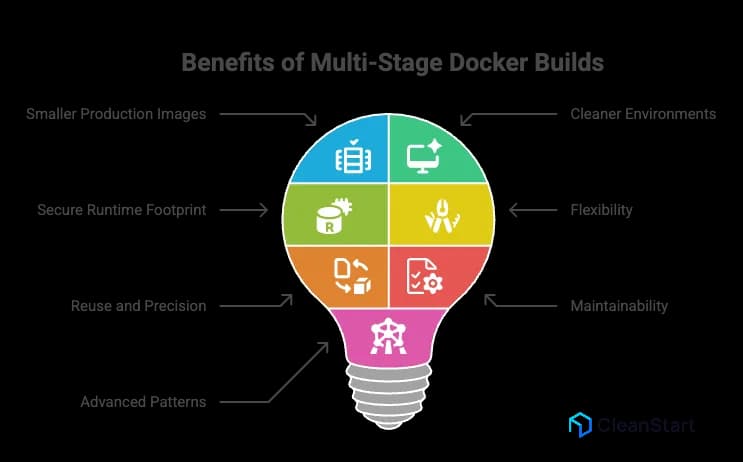
The benefits of multi-stage Docker builds come from using multiple stages in a multi-stage Dockerfile to separate the build from the runtime packaging, so the resulting image contains only what the application needs at runtime.
The following points are related to the benefits of multistage builds.
- Smaller production images: A multi-stage approach can reduce the final image size by copying only the compiled output and required files into the production image (the image for the runtime stage), producing a smaller image that is often significantly smaller than a single-stage Dockerfile that ships build dependencies. This supports container security because a lean runtime image removes unnecessary packages and tools, which reduces the attack surface and the number of components that can be exploited in production.
- Cleaner build and runtime environments: Multi-stage builds let you keep build tools and a heavier build environment in one stage, and use a minimal base image for the runtime in the next stage, which is the practical way to manage build and runtime environments without mixing concerns.
- More secure runtime footprint: The final runtime image is typically smaller and more secure because build-only components are excluded, reducing what the runtime image “contains” to only the runtime dependencies and application output.
- Flexibility with distinct stages: You can use different base images per stage, such as a stage with a java development kit to compile and a stage with a java runtime environment for execution, which creates optimized docker images without changing the application code.
- Reuse and precision in build flows: You can copy artifacts from one stage to another, define a new build stage for a distinct purpose, and control the stage of the build you produce by using the target build stage option with the docker build command when you need a specific build stage output.
- Better maintainability in one file: Multi-stage builds keep the full build order and build steps within a single dockerfile, which reduces duplication compared with maintaining separate build images or parallel Dockerfiles for one-stage versus production.
- Optional advanced patterns: The multi-stage pattern supports using an external image as a stage and moving outputs from one stage to another, which helps teams optimize your docker images while keeping the Docker build process consistent.
How do multi stage builds work in a Dockerfile?
Multi stage builds work in a Dockerfile by defining multiple build sections in one file and using each section for a distinct purpose, typically separating compilation from runtime packaging. This feature of Docker lets the build process create intermediate outputs without shipping the entire build environment in the final image.
The following points are related to how multi stage builds work in a Dockerfile.
- A Dockerfile starts with a base image reference. In a multi stage pattern, the Dockerfile repeats that pattern multiple times, so each stage begins with its own FROM line, creating a distinct build flow inside one file.
- Each stage produces an intermediate image. Early stages often include the full toolchain and dependencies required to build the application, while later stages are designed to keep the image size small by including only what the runtime needs. This is a practical pattern in containerization, where packaging the build output into a minimal runtime image helps you ship consistent, portable containers without carrying the entire build environment into production.
- The build process uses outputs from earlier stages to assemble the final image. The common mechanism is copying the compiled or packaged output from a build stage into a later stage, which is the practical meaning of separating the build environment from the runtime image.
- Compared with a single-stage Docker approach where one image “contains” both build tools and runtime files, a multi stage approach produces efficient Docker images because the final image includes only the runtime essentials.
What are some Multi stage Docker build examples for common stacks?
Multi-stage Docker build examples for common stacks follow the same concept of multi-stage: one stage compiles or packages the application, and a later stage produces a runtime image that contains only what is needed to run the app.
The following points are related to examples of a multi-stage build across common stacks.
- Python: A build stage installs dependencies and packages the app; a runtime stage copies the packaged output from the build stage so the final image contains only the Python runtime and the app files.
- Node.js: A build stage installs dependencies and creates a production bundle; a runtime stage copies the built output and only production dependencies so the runtime image contains the minimal set required to serve the app.
- Go: A build stage compiles a static binary; a runtime stage copies only the binary so the final image contains the executable and required runtime files only. This pairs well with cgroups, the Linux control groups that enforce CPU and memory limits for containers at runtime.
- Java: A build stage compiles the application into a JAR; a runtime stage copies the JAR into a smaller base that contains only a Java runtime, not the full build toolchain.
- Rust: A build stage compiles the binary; a runtime stage copies only the binary and required shared libraries so the final image contains runtime essentials only.
- .NET: A build stage restores and publishes; a runtime stage copies the published output so the final image contains the runtime and published artifacts only.
What are real world use cases for multi stage builds?
Real world use cases for multi stage builds are situations where you need heavyweight tooling to build an application, but you want a smaller, cleaner runtime image in production.
The following points are related to real world use cases for multi stage builds.
- Compiling binaries, then shipping only the binary: Build in one stage with compilers and SDKs, then copy the compiled output into a minimal runtime stage so production images stay lean.
- Frontend asset pipelines: Build UI assets in a build stage, then copy only the static build output into the final image that serves the app.
- Language ecosystems with native dependencies: Compile native modules in a build stage, then copy only the application and built artifacts into the runtime stage.
- Building and packaging in CI using one original Dockerfile: Keep build and runtime steps in one file so builds in Docker are repeatable across developer laptops and CI runners, and define a consistent container entrypoint that specifies the exact command the container runs on startup so every environment launches the same application process the same way.
- Creating different deliverables from the same Dockerfile: Use stage targeting to produce a production image, a test image, or a debug image from the same file when you need it, without changing how you run the Docker container.
- Reducing production footprint for faster delivery: Use multi stage to reduce the final image content, which can improve pull and rollout behavior; build times then depend primarily on caching and how each stage is structured.
- Separating build-time and runtime security posture: Build with full tooling in an isolated stage, then ship a runtime stage that excludes build tools to minimize what is present in production.
How do you create a multi stage Dockerfile step by step?
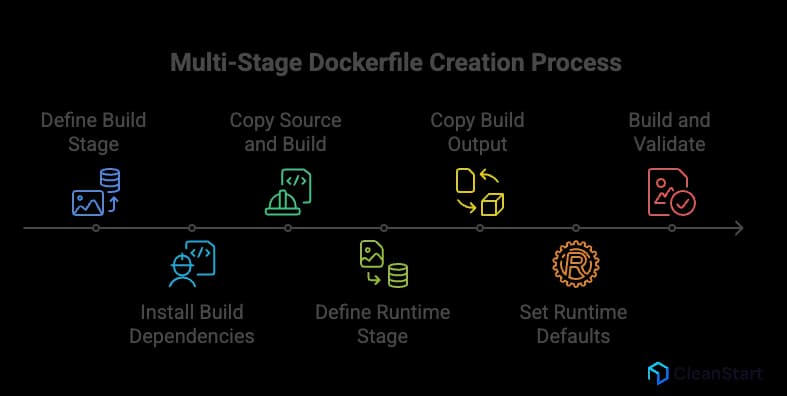
A step-by-step way to create a multi stage Dockerfile is to define one stage that builds your application, then a later stage that packages only the runtime essentials.
The following points are related to creating a multi stage Dockerfile step by step.
- Start by defining the build stage: Choose a builder base image that includes the toolchain your app needs, then set a working directory and copy in only the dependency manifests first to improve cache behavior.
- Install build dependencies in the build stage: Install the packages needed to compile or package the application so the build stage can produce a deployable output.
- Copy the full application source and build it: Copy the remaining source code into the build stage and run the build so it outputs a single artifact, such as a binary, JAR, or bundled directory.
- Define the runtime stage: Choose a smaller runtime base image that can execute the artifact without the build toolchain. This separation is the core reason teams leverage multi-stage builds.
- Copy the build output into the runtime stage: Copy the artifact from the build stage into the runtime image at a defined directory path, keeping only what is required to run the application.
- Set the runtime defaults: Configure the runtime command and any required environment settings so the container starts the application predictably.
- Build and validate: Build the image and run a container to verify the application starts and behaves as expected. If you need deeper options or edge cases, Docker docs provide the canonical multi-stage patterns and flags to help build repeatable images.
Want multi-stage patterns tailored to your stack and CI pipeline
Book a demo now!How were lean images produced before multi stage builds?
Before multi-stage builds, lean images were produced by separating “build” and “runtime” work outside a single Dockerfile, then manually moving only the final build output into a minimal runtime image.
The following points are related to how lean images were produced before multi-stage builds.
- Two-image workflow: Build the application in a dedicated “builder” Docker image that included compilers and dependencies, then create a separate “runtime” Docker image that contained only the runtime and the built artifact.
- Two Dockerfiles: Maintain a “builder Dockerfile” and a “runtime Dockerfile,” where the runtime Dockerfile copied only the final artifact into a minimal base image.
- Build in a temporary container, then export artifacts: Run a container from a builder image, compile inside it, then extract the artifact to the host (for example via a container copy step), and finally add that artifact into a separate runtime image.
- Build outside Docker: Compile on the CI runner or developer machine, then copy only the compiled artifact into the runtime image during the image build.
- Aggressive cleanup inside one image: Install build dependencies, build, and then remove build tooling in later steps; this reduced what remained at runtime, but it was fragile because earlier layers still existed in the image history and often did not reliably stay lean. This fragility becomes more visible under container orchestration, where platforms like Kubernetes schedule and scale containers across nodes, and bloated images increase pull time, rollout latency, and resource churn during frequent deployments.
How do you name build stages in a multi stage Dockerfile?
You name build stages in a multi stage Dockerfile by adding an alias to the FROM instruction using the AS keyword, then referencing that alias later, so the build stage can produce artifacts while the final stage stays aligned to the container runtime requirements by packaging only what the runtime needs to start and execute the application.
The following points are related to naming build stages in a multi stage Dockerfile.
- Define a stage name by writing FROM <base-image> AS <stage-name>.
- Use the stage name to copy outputs into another stage with COPY --from=<stage-name> <src> <dest>.
- Optionally build up to a named stage for debugging or CI by using docker build --target <stage-name> .
How does BuildKit affect multi stage build behavior?
BuildKit changes how multi-stage builds are executed and optimized, while keeping the core multi-stage Dockerfile semantics (multiple FROM stages and copying artifacts between stages) the same.
The following points are related to how BuildKit affects multi-stage build behavior.
- Parallel and graph-based execution: BuildKit analyzes the Dockerfile as a dependency graph and can run independent build steps and stages in parallel when there are no dependencies, which can reduce end-to-end build time for some multi-stage builds. This is useful when generating an SBOM, because the build can inventory the components used in each stage and produce a structured dependency record that supports auditing and compliance.
- More effective caching for repeat builds: BuildKit improves caching behavior and enables exporting and reusing cache across environments (for example via inline cache), which matters when multi-stage builds repeatedly install the same dependencies.
- Build-only mounts that don’t persist into layers: BuildKit adds RUN --mount features, including cache mounts (to speed dependency installs) and secret or SSH mounts (to access private resources during build) without baking those materials into the resulting image layers.
- Cleaner handling of sensitive inputs during multi-stage builds: BuildKit supports secret mounts and SSH mounts designed for build-time use, reducing the risk of leaking secrets through the image build history compared to putting them in layers.
In practical terms, BuildKit helps you understand how multi-stage builds can be faster and more cache-efficient, especially when stages include dependency installation and compilation steps.