



Container images have become a critical foundation of modern software delivery. Organizations rely on images from public and private registries to build, test, and deploy applications at scale.
However, pulling an image from a registry does not prove who created it, how it was built, or whether it has been modified after release. An image tag or registry location provides a reference, but it does not provide cryptographic evidence that the artifact is authentic.
Container image signing and verification solve this problem by creating a verifiable link between an artifact and its source. Signing allows publishers to attach cryptographic proof to container images, while verification allows consumers and deployment systems to confirm artifact identity and integrity.
Modern tools such as Cosign and Sigstore have made image signing more practical by enabling keyless workflows based on identity verification, short-lived certificates, and transparency logs. These capabilities allow organizations to move beyond trusting images based only on where they are hosted and toward verifying the software artifacts they deploy.
This guide explains how container image signing works, how verification is performed, how technologies such as Cosign and Sigstore enable modern signing workflows, and how organizations can enforce signature checks before images reach production.
Why Container Image Signing Matters Now
Container images have become a critical part of modern software delivery. Organizations consume images from public and private registries every day, often relying on image names, tags, and registry reputation when deciding what to deploy.
The challenge is that these signals do not provide enough assurance about the artifact itself.
A container image tag can point to different content over time. A registry account can be compromised. A trusted publisher's credentials can be stolen. Without additional verification, consumers have limited ability to prove that the image they deploy is the same artifact that was built and released by the expected source.
Container image signing addresses this trust gap by binding an artifact to a verifiable identity. A signature provides cryptographic evidence that an image was signed by a specific publisher or build workflow and allows consumers to detect unexpected changes after release.
Modern signing workflows have evolved beyond traditional key-based approaches. Tools such as Cosign and Sigstore use identity-based keyless signing, short-lived certificates, and transparency logs to make artifact signing easier to adopt at scale.
The shift is not simply from unsigned images to signed images. The broader change is moving from trusting where an image came from to verifying what artifact is being deployed.
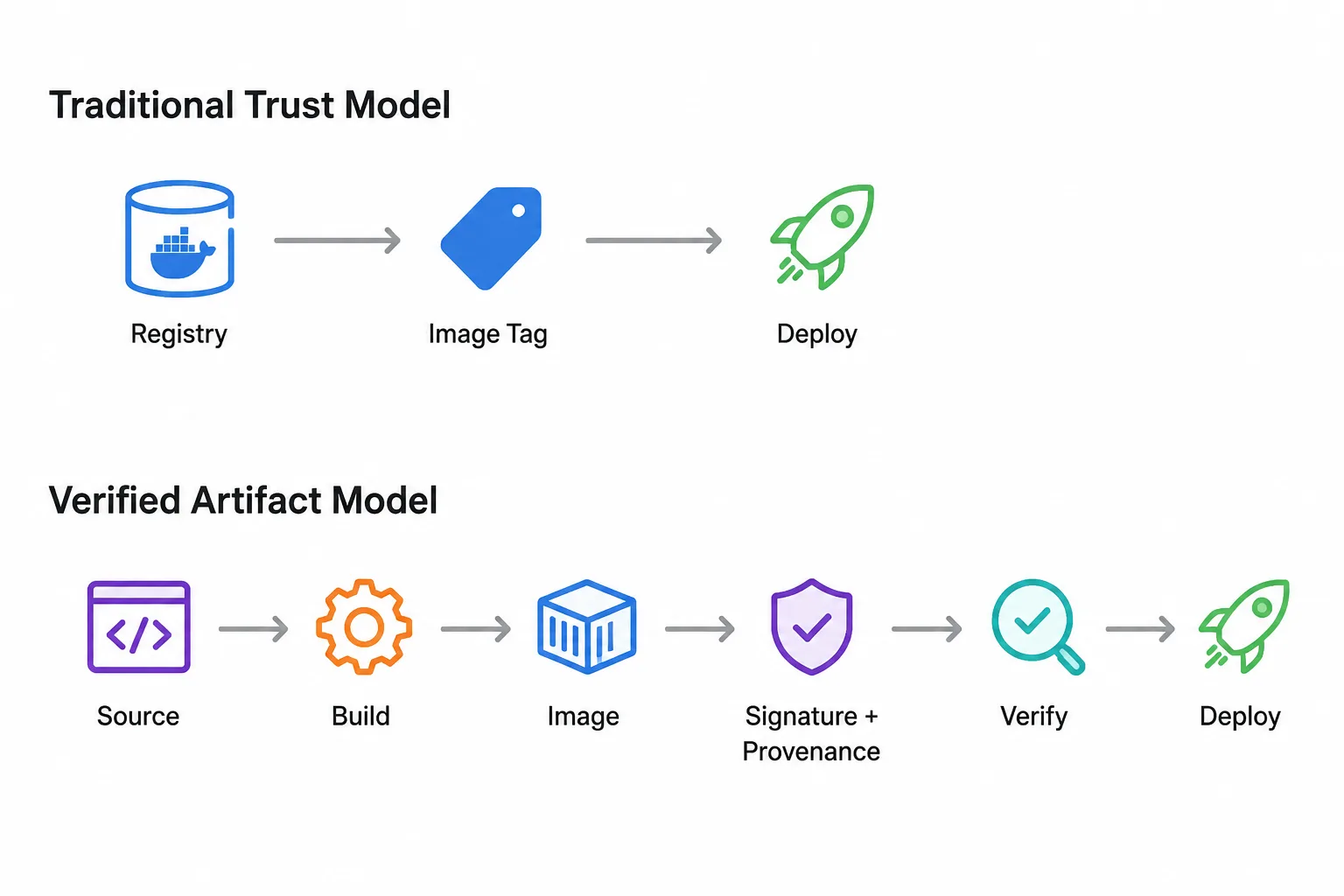
From Docker Content Trust to Modern Keyless Signing
Container image signing is not a new concept. Traditional approaches relied on managing cryptographic keys that were used to sign artifacts and verify their authenticity.
While effective, these approaches introduced operational challenges. Organizations had to securely create, distribute, rotate, and protect long-lived signing keys. At scale, key management became a significant barrier to adoption.
Docker Content Trust (DCT), based on The Update Framework (TUF) and Notary, was one example of an earlier image signing approach. However, adoption remained limited, and Docker announced the retirement of Docker Content Trust as the industry moved toward newer signing workflows.
The challenge was not that signing was unnecessary. The challenge was that earlier approaches were difficult to operate consistently across modern software delivery environments.
Modern keyless signing workflows address this by removing the need for long-lived private keys.
Instead of storing a permanent signing key, keyless signing uses workload identity, short-lived certificates, and transparency logs to create verifiable evidence about who signed an artifact and when the signing occurred.
This approach allows organizations to integrate signing into CI/CD workflows while reducing the operational burden associated with traditional key management.
Why Keyless Signing Changed the Model
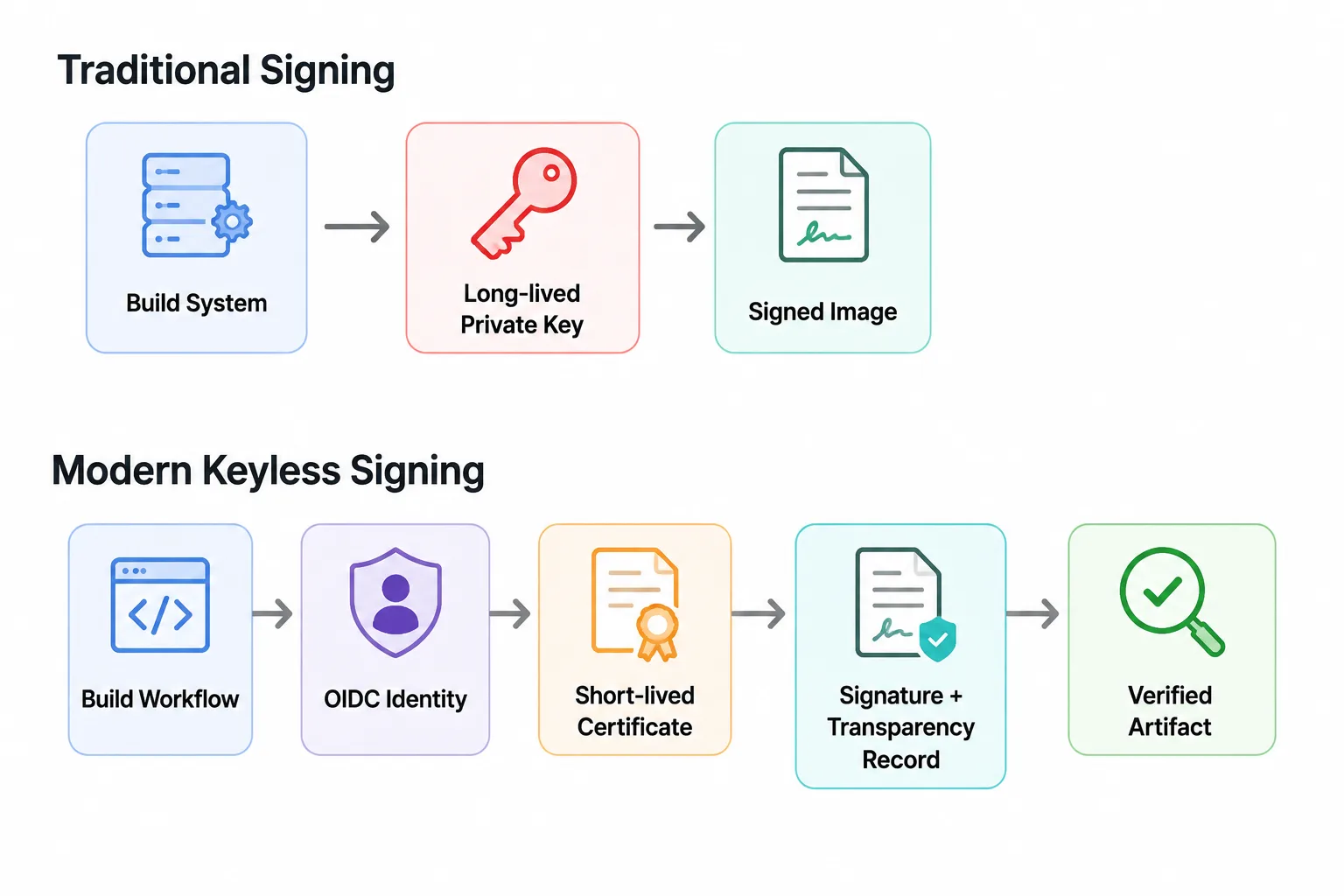
How Keyless Signing Works with Cosign and Sigstore
Keyless signing changes how organizations establish trust in container artifacts.
Instead of relying on a long-lived private key stored somewhere and protected over time, keyless workflows use identity-based verification. The signing event is tied to a trusted workload identity, creating evidence about who produced the artifact and how it was signed.
Tools such as Cosign, part of the Sigstore ecosystem, enable this workflow by combining:
- Identity verification through OpenID Connect (OIDC)
- Short-lived signing certificates issued by Fulcio
- Cryptographic signatures attached to image digests
- Transparency records stored in Rekor
The Keyless Signing Flow
- Workflow Establishes Identity
A CI/CD workflow generates an OIDC identity token that identifies the build process performing the signing operation.
Supported identity providers include:
- GitHub Actions
- GitLab CI
- Other OIDC-enabled platforms
This identity replaces the need for long-lived signing keys.
- Fulcio Issues a Short-Lived Certificate
Cosign presents the OIDC identity token to Fulcio, Sigstore's certificate authority.
Fulcio issues a short-lived X.509 certificate that links the workflow identity to the signing operation.
Unlike traditional signing models, the certificate is temporary and does not require long-term key management.
- Cosign Signs the Image Digest
Cosign signs the image digest rather than the image tag.
This matters because:
- Tags can change
- Digests identify immutable image content
The signature is therefore tied to the exact artifact being verified.
- Rekor Records the Signing Event
The signature and certificate information are recorded in Rekor, Sigstore's transparency log.
This creates a publicly auditable record linking the signing event to the signer identity, certificate, and artifact digest.
- Consumers Verify Before Deployment
Before deployment, consumers can verify:
- The signature is valid
- The signer identity matches expectations
- The artifact has not been modified
- The signing event is recorded in the transparency log
This transforms signing from a publishing step into an enforceable verification control across the software supply chain.
Together, these components create a verifiable record connecting an artifact to the identity and workflow that produced it.
Step-by-Step: Sign, Verify, and Enforce Container Images
Signing an image is only the first step. A complete verification workflow requires three stages:
- Sign the artifact so consumers can verify its origin and integrity.
- Verify the signature and associated attestations before trusting the artifact.
- Enforce verification policies so unverified images cannot reach production.
The following workflow demonstrates how organizations can implement container image signing using Cosign and enforce verification before deployment.
Prerequisites
Before starting, you need:
- Cosign CLI installed locally or in your CI/CD environment
- Access to an OCI-compatible registry such as Docker Hub, GitHub Container Registry, Amazon ECR, Google Artifact Registry, or Azure Container Registry
- A CI/CD system capable of issuing OIDC identity tokens for keyless signing
- A container image already pushed to a registry and referenced by its immutable digest
- Access to a Kubernetes cluster if testing admission-time enforcement
With keyless signing, no long-lived private key needs to be created or managed. The identity of the signing workflow becomes the basis for verification.
Step 1: Sign the Container Image
Cosign signs the image digest and attaches a cryptographic signature to the artifact.
cosign sign --yes registry.example.com/my-app@sha256:9f2b1c... Step 2: Verify the Signature
Verification confirms that the image was signed by the expected identity and that the artifact has not been modified.
cosign verify registry.example.com/my-app@sha256:9f2b1c... Verification confirms:
- Signature validity
- Expected signer identity
- Artifact integrity
Step 3: Verify Attestations
A signature answers:
“Who signed this artifact”
Attestations answer:
“What evidence exists about this artifact?”
Attestations can include:
- Build provenance
- SBOM information
- Vulnerability scan results
- Other supply chain metadata
Example:
cosign verify-attestation registry.example.com/my-app@sha256:9f2b1c... \ --type slsaprovenance \ --certificate-identity="https://github.com/my-org/my-repo/.github/workflows/build.yml@refs/heads/main" \ --certificate-oidc-issuer="https://token.actions.githubusercontent.com" A signed image is not automatically a trusted image. Organizations need additional evidence about how the artifact was produced, what it contains, and whether it meets security requirements.
Step 4: Enforce Verification at Deployment Time
Manual verification is useful for testing, but production environments require automated enforcement.
In Kubernetes environments, admission controllers can verify signatures and attestations before allowing workloads to run.
Policy engines such as:
- Kyverno
- Sigstore Policy Controller
- Ratify with Gatekeeper
can validate:
- Image signatures
- Certificate identity
- Provenance attestations
- Policy requirements
If verification fails, the deployment can be blocked before the image reaches production.
Platform Support for Image Signature Verification
Container image signing is only effective when verification happens before an image runs.
Modern platforms provide different ways to enforce image signature checks, depending on the deployment environment and policy requirements.
The enforcement point is typically the admission layer, where a platform can verify:
- whether the image is signed
- whether the signature matches an expected identity
- whether required attestations are present
- whether the artifact meets organizational policies
Kubernetes Environments
Kubernetes provides the broadest range of options because signature verification can be integrated through admission control.
Common approaches include:
Environment | Signing / Verification Approach | Enforcement Point |
Kubernetes | Cosign / Sigstore | Kyverno admission policies |
Kubernetes with Gatekeeper | Cosign, Notation, or other attestation frameworks | Ratify + OPA/Gatekeeper |
Sigstore-native workflows | Cosign signatures and attestations | Sigstore Policy Controller |
The common pattern is the same:
Image request → Admission controller → Signature verification → Allow or block deployment
Cloud Platform Support
AWS
AWS environments can use signing workflows based on AWS Signer and Notary Project integrations, with Kubernetes enforcement handled through policy engines.
The important consideration is not only signing the image, but ensuring verification occurs before workloads are scheduled.
Google Cloud
Google Cloud provides Binary Authorization capabilities for enforcing deployment policies based on image attestations and security requirements.
This allows organizations to require verified artifacts before deployment.
Microsoft Azure
Azure Container Registry and AKS environments are moving away from older Docker Content Trust workflows toward Notation-based approaches.
Modern verification workflows rely on OCI-compatible signing and policy enforcement mechanisms.
The Key Principle: Verify Before Deployment
Regardless of the platform, the security model is the same:
A signed image is only useful if the deployment system checks the signature.
The complete flow becomes:
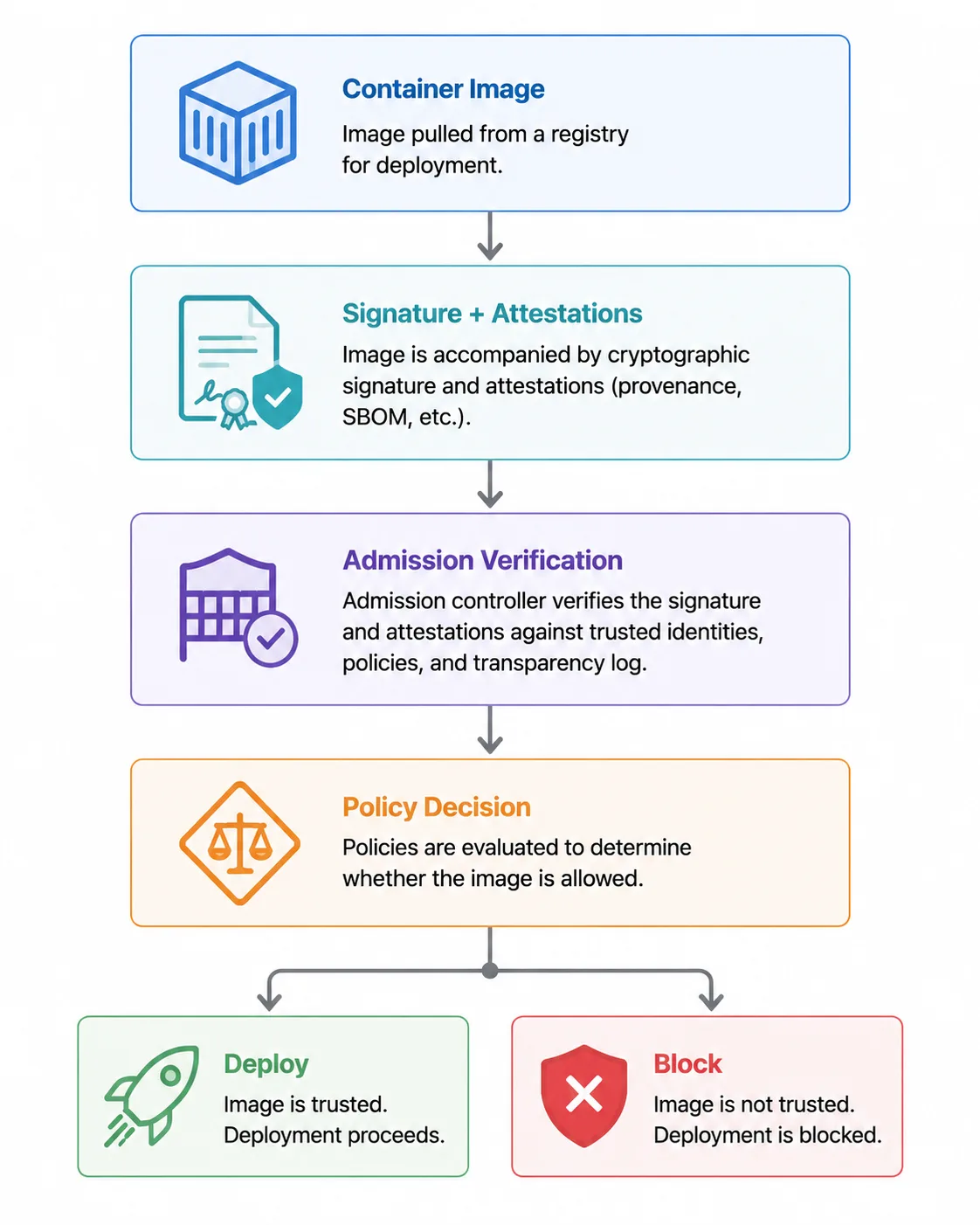
Without enforcement, signing remains informational.
With enforcement, it becomes a supply chain security control.
Hardened images reduce unnecessary attack surface. Signing and verification provide evidence that the artifact deployed is the artifact that was built and approved. Together, these controls create a stronger foundation for trusted software delivery.
Real-World Example: Why Image Verification Matters
Container image security is not only about preventing vulnerabilities inside an image. Organizations also need confidence that the artifact they pull is the artifact that was actually published by the expected source.
A recent container supply chain compromise demonstrated why this distinction matters.
In March 2026, threat actors used compromised credentials to publish malicious Trivy artifacts, including compromised Docker Hub images. The affected images were published under existing tags, including latest, making them appear like legitimate releases from the original publisher. Ref: GitHub
The incident highlighted a fundamental challenge in container security:
A valid registry location and image tag do not prove artifact authenticity.
An attacker who gains publishing access can create an image that appears legitimate unless consumers have additional verification controls in place.
What Image Signing Changes
Image signing provides a way to verify that an artifact was produced by the expected publisher or build workflow.
With signature verification, organizations can check:
- Who signed the artifact
- Whether the signature matches the expected identity
- Whether the artifact was modified after signing
- Whether required attestations are available
In this type of scenario, a compromised publishing credential alone would not be sufficient to establish trust.
Why Provenance Matters Beyond Signatures
A signature answers:
"Who signed this artifact?"
A provenance attestation answers:
"How was this artifact created?"
This distinction matters because modern software trust requires more than knowing that an artifact was signed.
Organizations increasingly need evidence about:
- the build workflow
- source inputs
- build environment
- generated artifact
The goal is not simply to verify that an image exists.
The goal is to verify that the image is the expected artifact.
Where Hardened Images Fit
Hardened container images reduce risk by minimizing unnecessary packages, dependencies, and runtime components.
Signing and verification address a different but complementary challenge:
- Hardened images reduce the attack surface.
- Signing verifies artifact identity and integrity.
- Provenance provides evidence about how the artifact was created.
Together, these controls create a stronger foundation for trusted software delivery.
Verified container images combine hardened foundations with cryptographic verification, helping organizations establish confidence that the artifact they deploy is the artifact that was built, validated, and released.
Troubleshooting Common Container Image Signing and Verification Errors
Implementing image signing is only the first step. Teams also need to understand common verification failures and how to diagnose them.
Below are some common issues encountered when implementing container image signing workflows.
"No matching signatures" During Verification
What it means
The verification command cannot find a signature that matches the expected identity, issuer, or artifact digest.
Common causes
- The certificate identity does not match the workflow that performed the signing.
- The OIDC issuer value is incorrect.
- The image digest being verified is different from the signed artifact.
How to troubleshoot
Verify the exact identity information recorded during signing rather than manually guessing values.
The verification criteria should match the identity of the build workflow that produced the artifact.
Certificate
What it means
A Fulcio certificate may show as expired when viewed after the signing event.
Why this is expected
Keyless signing uses short-lived certificates by design. The certificate proves the identity at the time of signing rather than acting as a long-term credential.
Verification relies on the transparency record to confirm that the certificate was valid when the artifact was signed.
Rekor Entry Cannot Be Found
What it means
The transparency log record associated with the signature cannot be located.
Common causes
- The verification process is checking the wrong transparency log instance.
- Tooling versions are outdated.
- The signing event was not recorded correctly.
How to troubleshoot
Confirm that:
- the correct Rekor instance is being queried
- signing tools are updated
- the artifact contains the expected signature metadata
Admission Controller Allows Unsigned Images
What it means
A policy that is intended to block unsigned images is not enforcing verification.
Common causes
- The policy is configured for audit mode instead of enforcement.
- Failure handling is configured incorrectly.
- The verification policy does not match the deployed image.
How to troubleshoot
Review admission policy configuration and ensure failed verification prevents deployment.
A security control that only reports violations does not provide the same protection as one that blocks unverified artifacts.
Verification Passes for an Unexpected Image
What it means
An image passes verification, but it is not the artifact or publisher the team expected.
Common causes
- Verification rules are too broad.
- Repository matching patterns are overly permissive.
- Identity requirements are not scoped tightly enough.
How to troubleshoot
Ensure policies validate:
- expected registry/repository
- expected signing identity
- expected workflow
- required attestations
Conclusion
Container Image Signing Turns Trust Into Verification
Container images have become essential building blocks of modern software delivery, but consuming an image from a registry does not automatically establish trust.
A tag, registry location, or publisher name can provide context, but organizations need stronger evidence about the artifacts they deploy.
Container image signing provides that evidence by creating a cryptographic connection between an artifact and its source. Verification allows teams to confirm that the image they deploy is the image that was built, approved, and released by the expected publisher.
Modern workflows using Cosign, Sigstore, and related technologies have made signing more practical by reducing many of the operational challenges associated with traditional key management with identity-based verification and transparency.
However, signing is only one part of a complete software supply chain security strategy.
Trusted software delivery requires multiple layers of assurance:
- Hardened images reduce unnecessary attack surface.
- SBOMs provide visibility into software components.
- Provenance provides evidence about how artifacts were created.
- Signatures verify artifact identity and integrity.
- Policy enforcement ensures only verified artifacts reach production.
The goal is not simply to sign more images.
The goal is to create software artifacts that organizations can verify, govern, and confidently deploy throughout the software supply chain.