



Immutable infrastructure replaces servers on every change instead of patching them in place. This article breaks down how it differs from mutable setups, why it improves consistency and reliability, how it fits into deployment pipelines, the key tools, trade-offs, real-world use cases, and a practical path to migrate gradually.
What is immutable infrastructure?
Immutable infrastructure is an infrastructure design pattern where you never modify a running server in-place after deployment. Instead, you build a new server image, deploy a new version, and replace the old instance entirely whenever you need a change, which also aligns well with modern container security practices where images are treated as disposable, versioned artifacts rather than patched in production.
In an immutable model, each server instance (entity) has the attribute “configuration state,” whose value is fixed at build time and cannot be changed via SSH or ad-hoc configuration change after it is deployed. If you need to update an nginx config, roll out a new version of the application, or apply a security patch, you:
- update the source configuration or infrastructure as code definitions
- rebuild a golden image using automation and configuration management tools like Packer, Ansible, or Puppet
- validate the new image in staging
- deploy a new server or container fleet and retire the existing server instances
What are the benefits of immutable infrastructure?
Immutable infrastructure delivers several clear advantages over a mutable model, especially when combined with containerization, where applications are shipped as versioned images rather than changed directly on running servers.
- No configuration drift across environments: In an immutable setup, each server image is built once and reused for every environment (dev, staging, production). Because you never log in over SSH to reconfigure a running instance, the configuration stays identical and you avoid subtle differences between versions of the same service.
- More predictable and reliable deployments: Every deployment replaces old instances with new ones built from the same image. On AWS, for example, an Auto Scaling group can roll out a new AMI and terminate the old fleet. This makes deployments more repeatable and reduces the chance of unexpected behavior compared to updating mutable servers in place.
- Faster and safer rollbacks: If a new version fails, rollback means switching traffic back to the previous image stored in your container registry rather than trying to fix a broken state on existing servers. In practice, that reduces mean time to recovery because you revert to a known-good image instead of debugging partial configuration changes.
- Stronger security posture: By design, teams avoid ad-hoc fixes and configuration changes on live servers. That reduces the attack surface created by unmanaged SSH access and undocumented changes. Security patches are applied by rebuilding images (for example, new Docker image or new AMI), then rolling out new instances.
- Better alignment with DevOps and automation: Immutable infrastructure fits naturally with DevOps pipelines. Tools like Packer, Docker, and infrastructure as code frameworks (Terraform, CloudFormation, etc.) build images, run tests, and automatically deploy them. Changes are auditable because every configuration change is made in code, not by manually logging into a server to configure it.
- Simplified scaling and elasticity: Scaling out becomes a matter of starting more identical instances based on the same image. Because each instance is pre-configured, the platform can add capacity quickly under load without running extra configuration steps on every new server.
- Clear separation of stateless and stateful components: Immutable patterns force teams to treat application servers as stateless and disposable, while handling database and storage separately. That separation usually leads to clearer architectures, easier blue–green or canary deployments, and safer schema or data migrations.
Overall, immutability replaces “configure and patch existing servers” with “build and deploy a new version,” which improves consistency, security, and deployment reliability in modern DevOps environments using AWS, Docker, cgroups, and infrastructure as code.
Start securing your stack now andpull container imagesbuilt for immutable workloads
How does immutable infrastructure work?
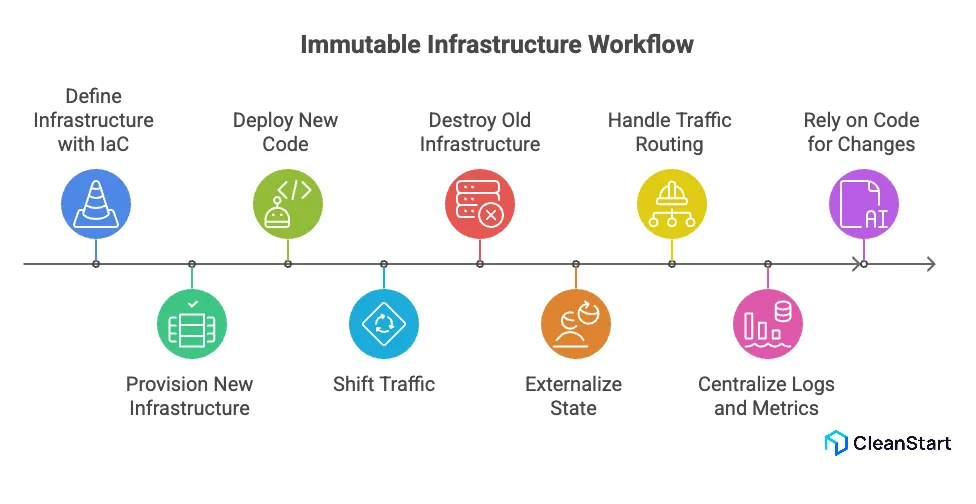
Immutable infrastructure works by treating servers and other infrastructure resources as disposable, versioned artifacts that are never changed after deployment, typically built from a repeatable Dockerfile or image template. Instead of updating a running production server, you always provision new infrastructure and then destroy the existing one once traffic has been shifted.
At a high level, the workflow looks like this:
- You define every infrastructure resource with IaC (infrastructure as code) and keep it in version control. In a typical cloud computing setup (for example, cloud infrastructure on AWS), this includes VMs, container images, networks, database server endpoints, and permissions.
- You use infrastructure automation to provision a fresh set of servers for each change.
Instead of mixing mutable and immutable infrastructure, the pipeline creates entirely new VMS or pods via container orchestration systems such as Kubernetes, plus any required AWS resources. - During the deployment process, you deploy new code only by rolling out new units.
When you deploy new code, the system brings up new infrastructure (new instances, new pods) that match the desired config; the existing instances are not updated after deployment. - The rule is: deployments complete successfully or nothing changes.
Immutable infrastructure refers to a model where any infrastructure changes must be applied by creating new instances; if health checks fail, you roll back by keeping the old fleet in place and discarding the new one. - State is handled by externalize patterns. Application workload servers in immutable setups avoid local state; data and sessions live in a separate database server, object storage, or cache tier, while artifacts like images and their SBOM are managed centrally. This makes it safe to destroy the existing servers on every release.
- Traffic routing and scaling are handled by the platform. In cloud infrastructure on AWS, you might use AWS Elastic services (Auto Scaling, load balancers) to deploy and scale immutable instances without needing to update the existing nodes directly.
- Logs and metrics are centralized. Because instances are short-lived, logs and metrics are streamed to external systems so security teams and operations teams can audit behavior even after instances are terminated.
- Security teams and operations rely on code, not SSH. In a truly immutable model, engineers do not log into servers to reconfigure them; to make immutable changes, they edit IaC definitions, rebuild images, and redeploy. This separation dramatically improves consistency and reliability for the whole environment.
What tools and platforms support immutable infrastructure?
Tools and platforms that support immutable infrastructure include everything from image builders and orchestrators to observability stacks that work together to ship a fixed container entrypoint and configuration as a repeatable, versioned unit.
- Infrastructure as Code tools: Terraform, CloudFormation, Pulumi define servers and infrastructure as code so every change is a planned, versioned rollout instead of mutable infrastructure tweaks.
- Image build tools: Packer, Docker build, Kaniko bake OS, runtime, and app into immutable images that must be replaced rather than patched after deployment.
- Config management used at build time: Ansible, Chef, Puppet run once during image creation instead of continually mutating live servers, reducing runtime mutability.
- CI/CD and delivery platforms; GitHub Actions, GitLab CI, Jenkins, Argo CD, Flux automate pipelines that build new images and roll out fresh instances, giving a clean example of immutable infrastructure in practice.
- Container orchestration and schedulers: Kubernetes, ECS, Nomad deploy workloads from versioned container images; old pods are destroyed and replaced, which aligns with the benefits of an immutable infrastructure.
- Cloud scaling and load balancing services: AWS Auto Scaling, Azure VM Scale Sets, Google managed instance groups rotate entire instance groups instead of updating the existing nodes in place.
- Observability and externalized state services: Central logging and metrics stacks (ELK, Loki, Prometheus) plus managed databases and object storage keep logs, metrics, and state outside servers, making it safe to follow an immutable infrastructure model end to end.
What are examples and use cases of immutable infrastructure?
- Stateless web and API tiers: Each release builds a new image and spins up a fresh web or API fleet behind a load balancer, then cuts over traffic (blue/green or canary) following immutable deployment best practices.
- Kubernetes microservices: Services run from versioned container images; Kubernetes creates new pods and removes old ones, with manifests and surrounding infrastructure as well defined in code.
- Auto scaled application tiers in the cloud: Auto Scaling Groups or managed instance groups launch instances from the latest image and replace old nodes during updates, using immutable infrastructure to keep behavior consistent as you scale.
- Security hardened images: Security teams ship locked-down images and replace running instances when fixing vulnerabilities instead of patching servers in place, reducing drift and tightening change control.
- SaaS continuous deployment: SaaS products package each change into a new image, test it, then promote the same artifact through staging to production, combining frequent releases with stable, immutable runtime units.
- Ephemeral CI and test workers: CI jobs run on short-lived VMs or containers created from a standard image and destroyed after use, so any environment change requires an image rebuild rather than manual tweaks.
Want This Running In Your Environment?
Book A Cleanstart Demo Now!What are the challenges and trade offs of immutable infrastructure?
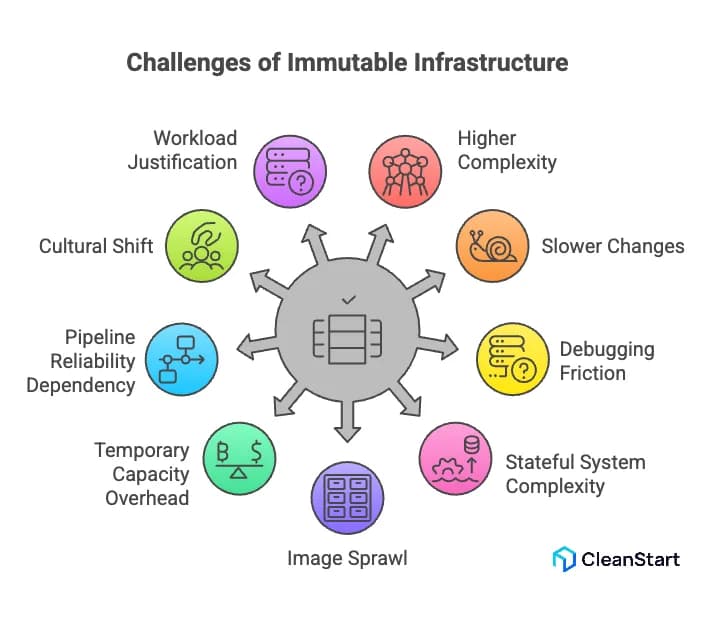
Immutable infrastructure introduces several real challenges and trade-offs that teams need to plan for, especially as systems and the underlying container runtime environments grow in size and complexity.
- Higher upfront complexity and tooling investment: To make servers immutable, you need reliable image build pipelines, infrastructure as code, CI/CD, and automated tests. For a small team moving from manual changes on a handful of servers, this can feel like a big jump in process, tooling cost, and learning curve.
- Slower “tiny changes” because everything requires a rebuild: With immutability, even a small configuration tweak or log level change must go through image rebuild, test, and redeploy. That adds latency to work that, in a mutable model, might be a one-line change on a server. If pipelines are slow, the friction becomes noticeable.
- Operational friction for debugging and hotfixes: In production incidents, engineers are used to SSHing into a server, changing a config, and restarting a process. In an immutable model, that pattern is discouraged or banned. You must capture the fix in code, rebuild, and redeploy, which is safer long-term but can feel slower under pressure if your processes are not well-tuned.
- Handling stateful systems and data is more complex: Immutable patterns are a natural fit for stateless web and API tiers. Databases, queues, and stateful services are harder. You must separate compute from storage, design migrations carefully, and coordinate rollouts so data and schema stay consistent while you replace nodes.
- Image sprawl and artifact management: Every change creates a new image (VM image, container image, or both). Without clear retention and cleanup policies, registries and image stores fill up quickly, making it harder to know which artifacts are safe, supported, or compliant to deploy.
- Temporary capacity and cost overhead during deployments: Blue/green or rolling deployments often run two versions at once. For a large cluster, that means extra compute and network capacity during rollout. If deployments are frequent or clusters are large, this overhead shows up as noticeable cloud spend.
- Stricter dependency on pipeline reliability: When everything goes through automated pipelines, a broken pipeline or failing shared stage can block all changes. In a mutable setup, teams might “work around” CI issues by touching servers directly; with immutable infrastructure, you must fix the pipeline first or accept blocked releases.
- Cultural and skill set changes for teams: Operations and development teams must get comfortable with “change it in code or don’t change it at all.” That requires stronger Git discipline, better testing, and a mindset shift away from server-as-pet habits. Teams that do not make this shift can end up with shadow practices that undermine immutability.
- Not every workload justifies full immutability: For small, low-criticality systems with infrequent changes, the engineering effort to build full immutable pipelines may not pay off. In those cases, a hybrid approach (immutable for core services, simpler processes elsewhere) can be more pragmatic, but it reduces uniformity of operations.
How is immutable infrastructure different from mutable infrastructure?
Aspect | Mutable infrastructure | Immutable infrastructure |
Change model | Updates existing servers in place with patches, config edits, and package upgrades. | Never edits a running server; every change creates a new image and new instances, old ones are removed. |
Configuration and drift | Config tools and manual SSH changes run repeatedly, causing configuration drift. | Config is applied once during image build; all instances come from the same image, minimizing drift. |
Deployment behavior | Deployments modify existing nodes, risking half-updated or inconsistent states. | Deployments create new instances with the new version and shift traffic to them. |
Rollback strategy | Rollback often requires manual fixes or partial re-deployments on existing servers. | Rollback routes traffic back to the previous image or version without touching existing nodes. |
Server lifespan | Servers are long-lived “pets” that are patched and repaired over time. | Servers are short-lived “cattle” that are discarded and recreated when changes are needed. |
Debugging and hotfixes | Debugging and hotfixes often happen directly on production servers via SSH. | Fixes are made in code or build definitions, then shipped as new images; direct edits are discouraged. |
Tooling requirements | Can operate with limited automation; manual administration is common. | Relies on solid CI/CD, image build pipelines, and infrastructure-as-code for every change. |
Consistency across hosts | Hosts may run slightly different configs and versions, reducing reproducibility. | All hosts for a given release are identical, improving reproducibility and predictability. |
Compliance and auditability | Harder to prove exact state because of ad-hoc changes and long-lived servers. | Easier to audit because each image is versioned, traceable, and deployed uniformly. |
Operational flexibility | Highly flexible for quick, ad-hoc changes but more error-prone over time. | Less flexible for ad-hoc changes but more controlled, stable, and predictable in the long run. |